
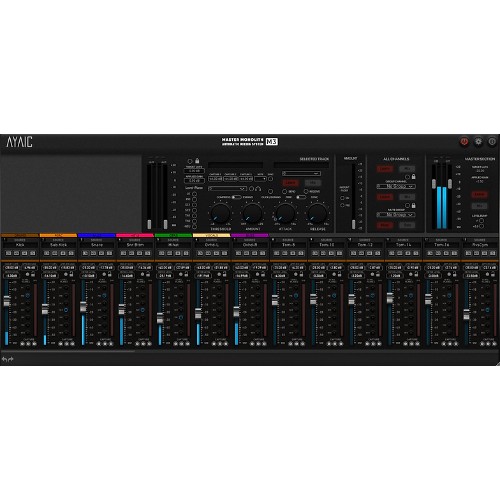

Master Monolith Mixer
M3 is an advanced evolution of Mix Monolith, designed to bring a more traditional mixing feel while preserving the full power of the Monolith system. It keeps all core features and introduces expanded flexibility and control, adaptable to any workspace.
Built for producers, mix and mastering engineers, musicians, and singer songwriters, M3 streamlines professional mixing with precision tools, scalable layout options, and an intuitive workflow that adapts to your creative process.
Features
-
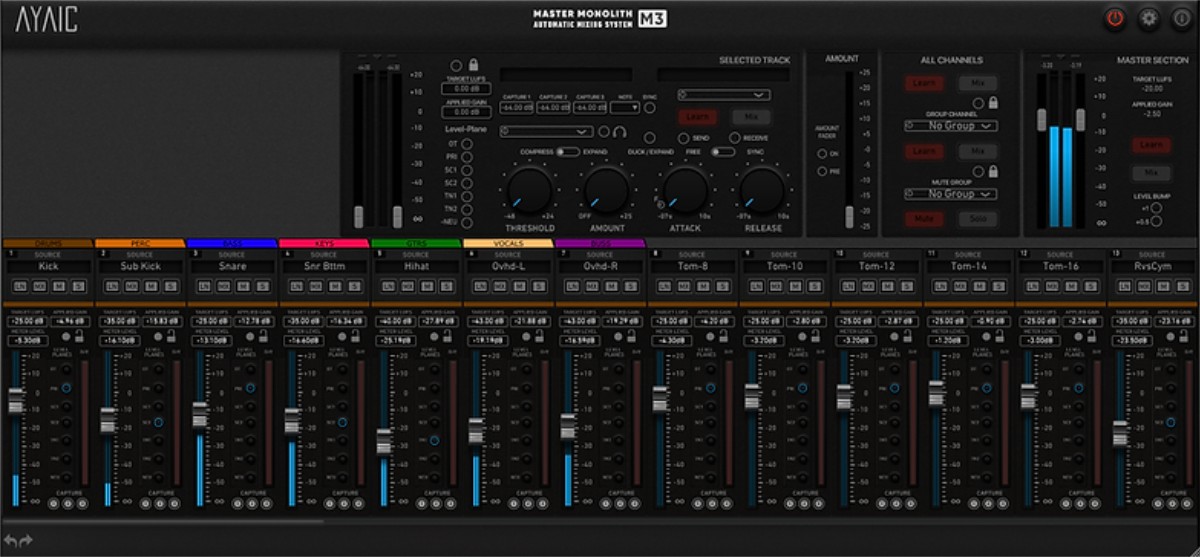
Unlimited Monolith channels
-
Unlimited automation capabilities
-
Faders display applied gain settings
-
3 Gain Capture buttons per channel with host BPM sync
-
Individual Monolith Mute/Solo
-
Group Learn/Mix/Lock
-
All Channels Lock
-
Master channel level bump buttons (+.5dB & +1dB)
-
Undo/Redo
-
Self Duck/Exp feature
-
Fader Follow Duck/Exp amount
-
Expandable mixer to fit your workflow
-
Order Satellites By Color / By Group
-
Numbered modules
-
Stable module positioning
-
Group tabs to hide/unhide groups of modules
-
Infinite color palette with original sub palette
-
Designated Amount fader with pre fader select
-
Order modules by DAW
-
Level plane button selection
-
Satellites have Target LUFS Learn Mix controls
-
Free scale sizing
Mac:
- macOS 10.10 - 11.0.1
- Intel Core 13 or higher
- 4 GB RAM
Windows:
- Windows 7 - 10
- Intel Core 13 or higher
- 4 GB RAM
Enregistrement Requis:
AyaicWare products require you to register with the manufacturer at www.ayaicinc.com and with www.ilok.com to activate your license.
This product requires an activation!
For the activation you can either choose between using an iLok dongle (iLok 2 or iLok 3) or the iLok Cloud authorization process.
The iLokDongle can be used to run the protected software on different computers. Your licenses can be easily manged using the iLok License Manager. A internet connection on any computer and a free user-accout at www.ilok.com are required to authorize the product. To protect your investment against theft or loss we recommend the iLok Zero Downtime protection with TLC.
*This USB protection device is not included with your order, it is a separate item you have to buy additionally.
iLok Cloud requires an iLok account, which can be setup for free at www.ilok.com. Please install the latest version of iLok License Manger so you can manage your authorizations and active an iLok Cloud session. An active internet connection is required for all iLok Cloud sessions.
Please check with the software manufacturer which iLok version is required at least if you want to use a hardware iLok!
