





80s Electronic Sounds and Arrangements
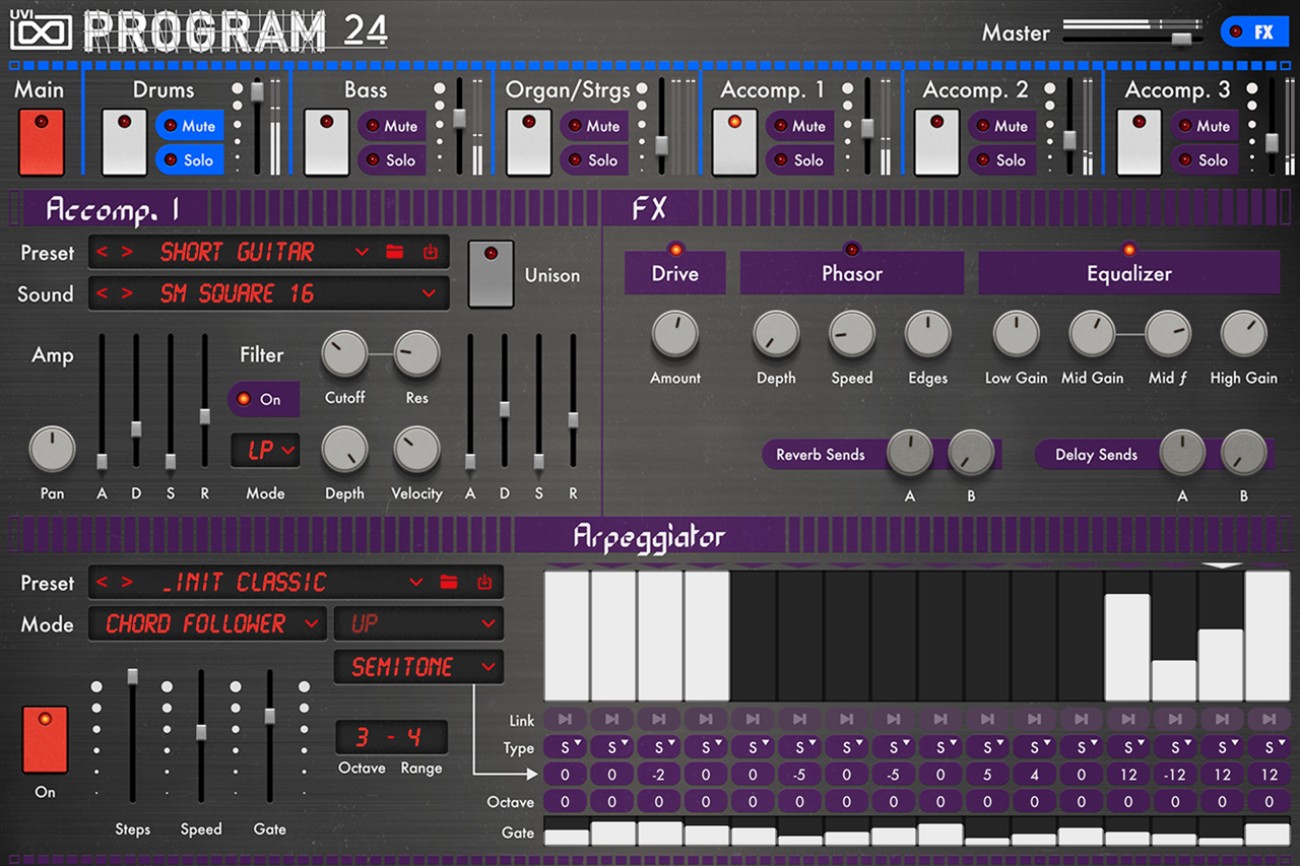
Program 24 is a virtual instrument inspired by the Solton Programmer 24 and SM100, combining drums, bass, arpeggios, strings, organs and accompaniment voices. It includes multi kits, individual sound presets, arpeggiators, drum kits and MIDI patterns covering vintage and contemporary electronic styles. The multi instrument allows complete arrangements to be programmed in a DAW, while individual instrument sections can also be loaded separately. Effects include multimode filters, drive, phaser, EQ, reverb, delay, compression and 2-bus processing.
Features
-
Sounds inspired by the Solton Programmer 24 and SM100
-
8-bit PCM drum sounds
-
Analog bass and lead arpeggio sounds
-
Violin, cello and flute voices
-
Multi kits and individual sound presets
-
Arpeggiators and chord follower arpeggiators
-
Drum MIDI patterns and MIDI files
-
Programmable multi instrument
-
Individual drum, bass, string, organ and accompaniment sections
-
Per-instrument multimode filters, drive, phaser and EQ
-
2 reverb sends and 2 delay sends
-
2-bus drive, compressor and EQ
Mac:
- MacOS 10.14 Mojave to macOS 26 Tahoe
- 4 GB RAM
Windows:
- Windows 10 to Windows 11 (64-bit)
- 4 GB RAM
Enregistrement Requis:
To use UVI products, you must register with the manufacturer at www.uvi.net. A free iLok account is also required for license activation. Download, installation, and product management are handled through the free UVI Portal.
This product requires an activation!
You can either "soft" activate on your computer without addditional hardware or transfer the license to an iLok USB dongle which has to be purchased separately. The iLok dongle can be used to run the protected software on different computers. Your licenses can be easily manged using the iLok Licence Manager. To protect your investment against theft or loss we recommend the iLok Zero Downtime protection with TLC.
An internet connection on any computer and a free user-accout at www.ilok.com is required to authorize the product.
Please check with the software manufacturer which iLok version is required at least if you want to use a hardware iLok!