

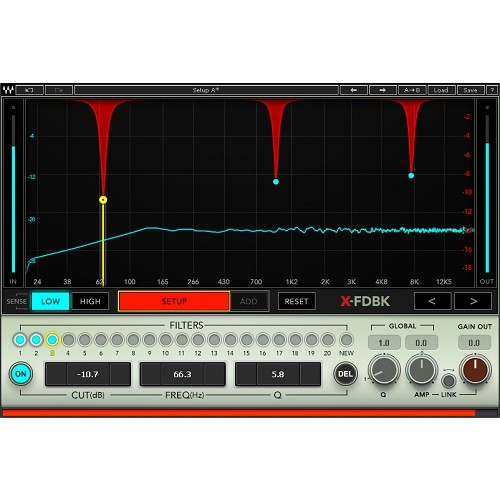

X-FDBK is the first plugin ever to provide a complete automatic feedback suppression solution. Whether you’re an FOH engineer mixing for thousands or a singer performing with your own compact PA system, you can now get a loud, clear and feedback-free mix in seconds. This way you have one less thing to worry about and you can focus on what’s really important – your mix.
The problem
One of the most important steps before any soundcheck or show is “ringing out” the wedges and PA – pushing them to a volume that produces audible feedback, then identifying the feedback frequencies and cutting those frequencies using a graphic equalizer. Doing this by ear is slow, painful, imprecise, and hence not completely effective. Moreover, to avoid feedback the monitors are often being tamed; as a result, the performers can’t hear themselves loud enough.
The solution
X-FDBK dramatically improves the “ringing out” process and shortens it to a matter of seconds. It identifies the feedback frequencies quickly and precisely and cuts them with a narrow notch, preserving the fidelity of the wedge or PA and enabling you to maximize the gain without getting feedback.
All you need to do is turn up the levels on your wedges and PA until they start to feedback. Then activate the plugin and wait a few seconds until you hear the feedback disappear.
The plugin's graphic frequency spectrum shows you all feedback frequencies and the degree to which they were cut, letting you tweak them manually if you wish.
Take Control
Everyone wants their monitors and PA as loud and clear as possible and without any feedback. With X-FDBK, you can achieve this easily within seconds.
-
Automatically cuts the frequencies that cause feedback
-
Get a clearer, louder, feedback-free sound from your monitors and PA
-
Set it and forget it
-
Dramatic improvement to your live sound and workflow
-
Quick and easy to use
-
A must-have survival tool for any live sound engineer or live performer
Mac:
- macOS Ventura 13, Sonoma 14, Sequoia 15, Tahoe 26
- Intel or Silicon Architecture
- RAM: 8GB (16GB recommended)
- 1024x768 or higher display resolution
Windows:
- Windows 10 / 11
- 64 bit
- X64 compatible Intel or AMD CPU
- RAM: 8GB (16GB recommended)
- 1024x768 or higher display resolution
Please check for details and latest information HERE!
Bundle- / Product-Content
All Plug-Ins, Collections and Bundles include the identical content/version as described on www.waves.com. As the content/version might be extended by the supplier from time to time, our descriptions might not be up to date in rare cases.
To always get the latest WAVES version, you need a valid WavesUpdatePlan "WUP". With a new purchase of PlugIns and Bundles 12 month of Free Update Plan are included!
Enregistrement Requis:
Waves products require you to register with the manufacturer at www.waves.com to activate your license.
This product requires an activation!
An internet connection is required to authorize / activate the product.