
Preamp und EQ Emulation einer Helios-Konsole
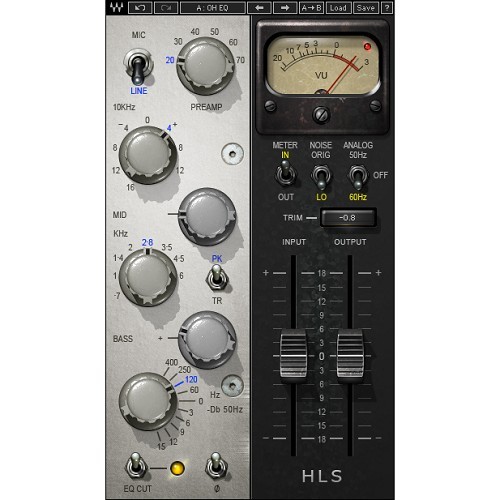
Entwickelt in Zusammenarbeit mit Eddie Kramer basiert das Kramer HLS Channel Plug-in auf der Emulation einer Helios Konsole aus den 60er Jahren, die in den legendären Olympic Studios London genutzt wurde. Das Plug-in dient sowohl als Preamp als auch EQ und bietet eine Line- und Mic-Preamp-Simulation sowie ein Dreiband-EQ.
Weitere Details in englischer Sprache:
Developed in association with legendary producer/engineer Eddie Kramer, the HLS Channel was meticulously modeled on a Helios mixing console just like the one he used in historic sessions at London’s acclaimed Olympic Studios. In addition to modeling the Helios EQs with their sweet saturation, high-end presence, and fat low-frequency boost, Waves even modeled the unique behavior, coloration, and drive of the console’s preamps. To top it all off, the HLS Channel features a precision-modeled VU meter that recreates the sensitivity, ballistic behavior, look and feel of the original.
Features:
- Modeled EQ / mic pre-amp plugin
- Based on a rare '60s vintage Helios console
- Modeled mic and line preamp drive
- Developed in association with legendary producer / engineer Eddie Kramer
- As used in London's famed Olympic Studios
Mac:
- macOS Ventura 13, Sonoma 14, Sequoia 15, Tahoe 26
- Intel or Silicon Architecture
- RAM: 8GB (16GB empfohlen)
- 1024x768 oder höhere Bildschirmauflösung
Windows:
- Windows 10 / 11
- 64 bit
- X64 compatible Intel or AMD CPU
- RAM: 8GB (16GB empfohlen)
- 1024x768 oder höhere Bildschirmauflösung
Bitte überprüfen Sie Details und aktuellste Informationen HIER
Bundle- / Produkt-Inhalt
Alle Plug-Ins, Collections und Bundles enthalten generell den aktuellsten, identischen Umfang, wie auf www.waves.com angegeben. Da die Produkte von Zeit zu Zeit erweitert werden, können unsere Inhaltsangaben u.U. nicht mehr aktuell sein.
Um immer die aktuellste WAVES Version zu erhalten, benötigen Sie einen gültigen WavesUpdatePlan "WUP". Bei Neukauf von PlugIns und Bundles sind 12 Monate Free Update Plan enthalten
Erforderliche Registrierung:
Für die Nutzung von Waves Produkten müssen Sie sich beim Hersteller unter www.waves.com registrieren, um Ihre Lizenz zu aktivieren.
Dieses Produkt benötigt eine Aktivierung!
Zur Autorisierung / Aktivierung des Produktes benötigen Sie eine Internet Verbindung.
