
Deals

Ample China v4 is here – new sounds, a new instrument, and up to 25% off
Ample Sound brings its China Series to version 4 and expands the collection with the brand-new Ample China Xun. To celebrate the release, selected Chinese instruments and bundles are on sale through October 25, with Ample China Xun starting at just $89.
Even better for existing users: the v4 upgrade is completely free.



Ample China Qudi – Bright, Clear Flute Tones with Traditional Character
Ample China Qudi (ACQD) brings the bright, rounded and transparent sound of a traditional Chinese Qudi into your studio. The Qudi is one of the most distinctive forms of Chinese bamboo flute and was traditionally used to accompany Kunqu opera.
For this library, an Elegant Wind Series Qudi in D by Jianhong Wang was recorded and performed by Xiaokui Ding, wind instrumentalist of the China National Traditional Orchestra. In total, the library includes 4.4 GB of high-quality sample content with a wide range of articulations, legato transitions and expressive playing techniques.
Brilliant, Agile and Versatile
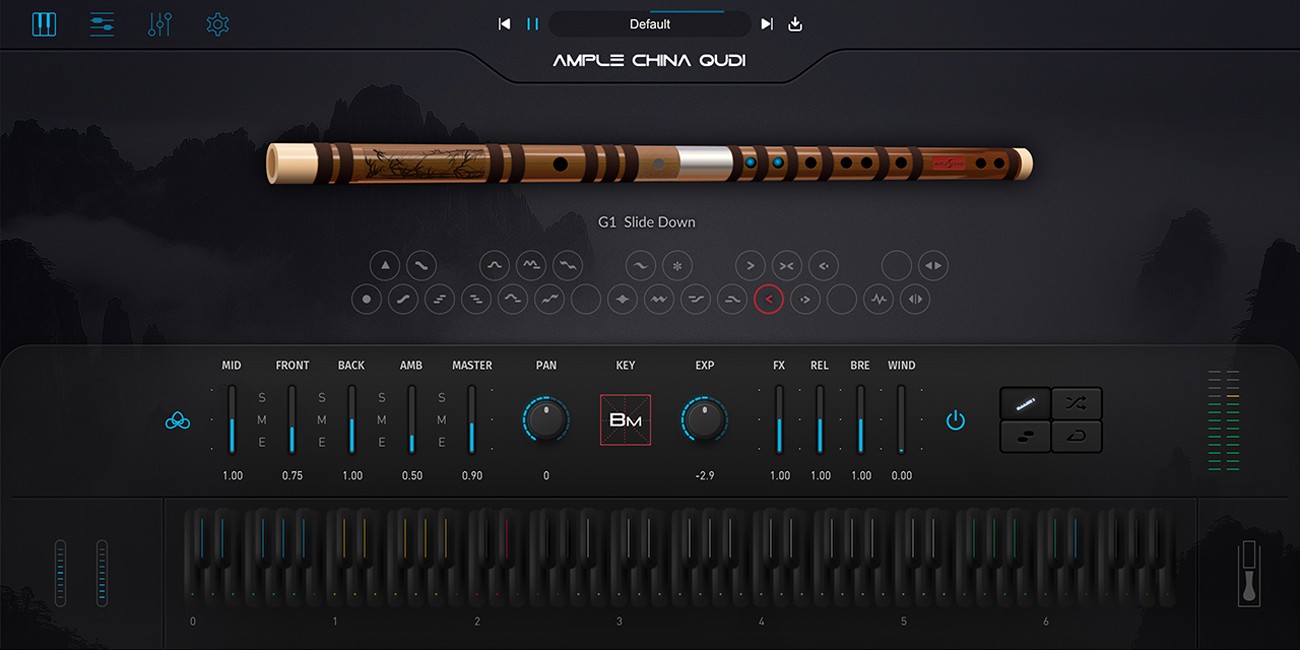
Ample China Qudi provides extensive Head, Body and Special Effects Groups. The Head Group includes 10 articulations such as Sustain, Tonguing, Grace Notes, Arpeggios, Mordent, Pre-Trill and Glissando. The Body Group offers 12 additional playing techniques, including Espressivo, Vibrato, Trill, Flutter, Slides, Slide Turn and Repeated-Note Legato.
The articulations can be used both as ornaments and as fluid transitions between individual notes. The intelligent legato system automatically detects suitable connections based on timing and uses up to five velocity layers for naturally responsive phrases.
Flexible Microphone Control and Riffer 4
The instrument was recorded with five microphones, including Front, Mid, Rear and stereo Distant positions. Three microphone modes provide different tonal and spatial characteristics. Individual samples average around eight seconds in length, allowing most notes to decay naturally without looping, while looping can be enabled when longer sustained notes are required.
Riffer 4 is specifically designed around monophonic wind instruments and legato playing styles. Unnatural polyphony is automatically prevented, while Auto Expression and Auto Vibrato can generate suitable dynamic curves. Articulations, legato, expression, MIDI CCs and velocity can all be edited directly without relying on constant keyswitching or complex MIDI programming.
Features at a Glance:
- 4.4 GB of high-quality Qudi sample content
- Elegant Wind Series Qudi in D by Jianhong Wang
- Performed by Xiaokui Ding of the China National Traditional Orchestra
- 10 articulations in the Head Group
- 12 articulations in the Body Group including Vibrato, Trill, Flutter, Slides and Legato
- Intelligent legato system with up to 5 velocity layers
- 5 microphones and 3 microphone modes
- Samples averaging around 8 seconds in length with optional looping
- Riffer 4 with Auto Expression and Auto Vibrato
- Direct editing of articulations, legato, expression, MIDI CC and velocity
- MIDI import and export plus Quantize, Swing, Legato and Monophonic tools
- Studio FX: 8-band EQ, Compressor, Delay and Convolution Reverb
Ample China Qudi combines the brilliant, lively sound of this traditional bamboo flute with modern sampling and performance technology, making it an excellent choice for film, games, world music, expressive solo passages and detailed acoustic arrangements.
Mac:
- macOS 10.15 or later
- 64-bit
- Intel Core i5, Apple Silicon M1 or higher
Windows:
- Windows 8–11
- 64-bit
- Intel Core i5, AMD Ryzen 5 or higher
Required Registration:
Ample Sound products require you to register with the manufacturer at www.amplesound.net and with www.ilok.com to activate your license.
This product requires an activation!
You can either "soft" activate on your computer without addditional hardware or transfer the license to an iLok USB dongle which has to be purchased separately. The iLok dongle can be used to run the protected software on different computers. Your licenses can be easily manged using the iLok Licence Manager. To protect your investment against theft or loss we recommend the iLok Zero Downtime protection with TLC.
An internet connection on any computer and a free user-accout at www.ilok.com is required to authorize the product.
Please check with the software manufacturer which iLok version is required at least if you want to use a hardware iLok!
