

Deals

Divisimate 2.1 now 20% off!
Divisimate 2 lets you orchestrate live performances in real time with virtual instruments. Easily split chords into voices, assign them to different instruments, and create dynamic, playable orchestrations on the fly.





Next Generation Orchestration Engine
Divisimate 2 lets you orchestrate live performances with virtual instruments in real time. Split chords into individual voices, assign them across your instruments, and create playable, multi-layered orchestrations. Transform simple chord progressions into expressive arrangements and perform them live or record them in your DAW.
-
Split chords into up to eight voices with three Divisi Modes.
-
Route voices to 32 ports and control up to 512 virtual instruments.
-
Transpose and customize parts to create individual voicings and orchestrations.
-
Create textures, patterns and melodies with five modifier plugins.
-
Set separate keyboard ranges for melodies, chords, bass and keyswitches.
-
Split the keyboard into two or three independent orchestration zones with Key Split.
-
Add human-like variations with the humanization engine.
-
Switch orchestrations, merge instrumentations and create complex patches with the Multipad Editor.
-
Assign presets, scale changes and other functions to keyswitches with Key Range Remote.
-
Use Divisimate standalone or as a DAW plugin.
Orchestrate Page
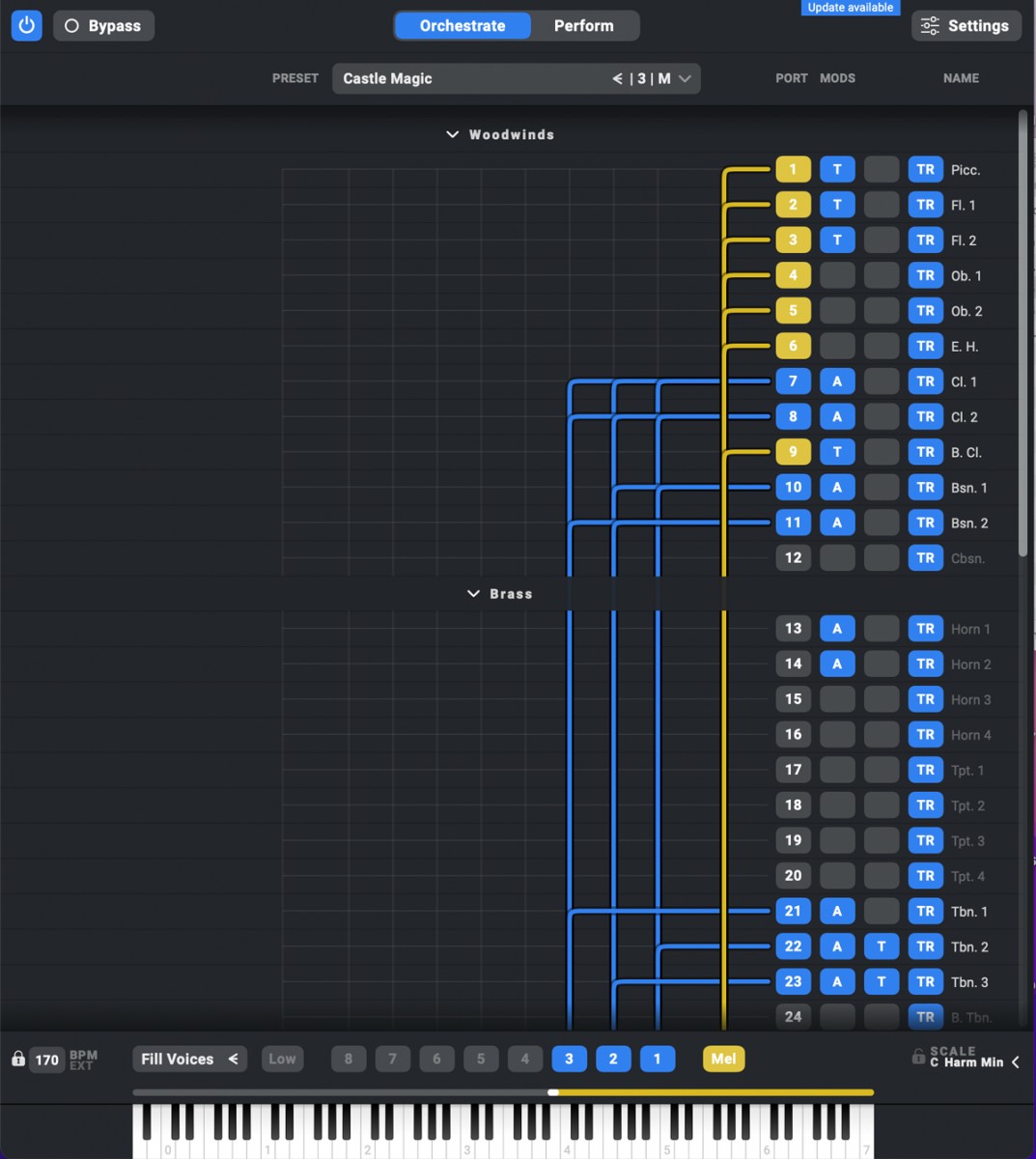
Activate voices and keyboard ranges, route them to one of the 32 multitimbral Divisimate Ports, and add modifier plugins to customize your orchestration. Keyboard ranges can be assigned to melodies, chords, basses and keyswitches, while Key Range Remote provides direct control over presets, scale changes and other functions.
Perform Page
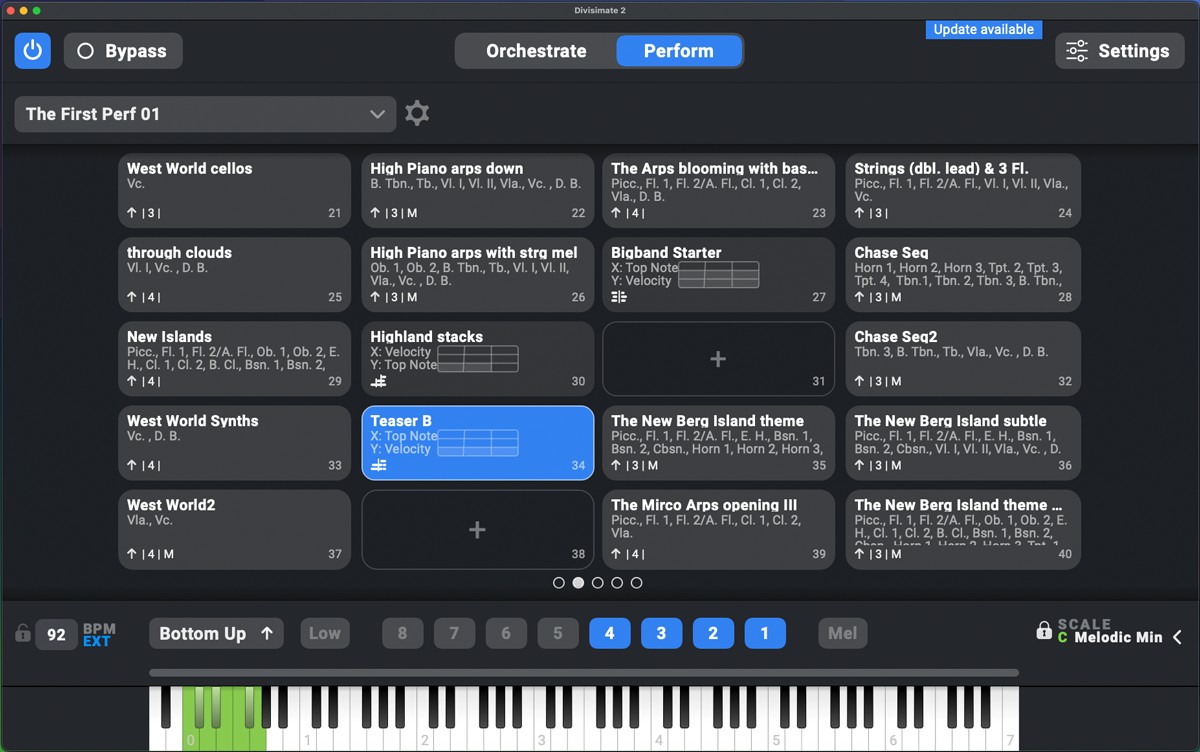
Organize up to 400 presets on the Perform Page and switch between orchestrations instantly. Use the Multipad Editor to combine multiple orchestrations into playable patches. Key Split lets you divide the keyboard into two or three independent orchestration zones, each with its own Divisi Engine and routing. Arpeggiators remain synchronized across the split zones.
Modifier Plugins
Apply different plugins to every individual port to customize your orchestration.
-
Transposer – Transpose each part and range independently.
-
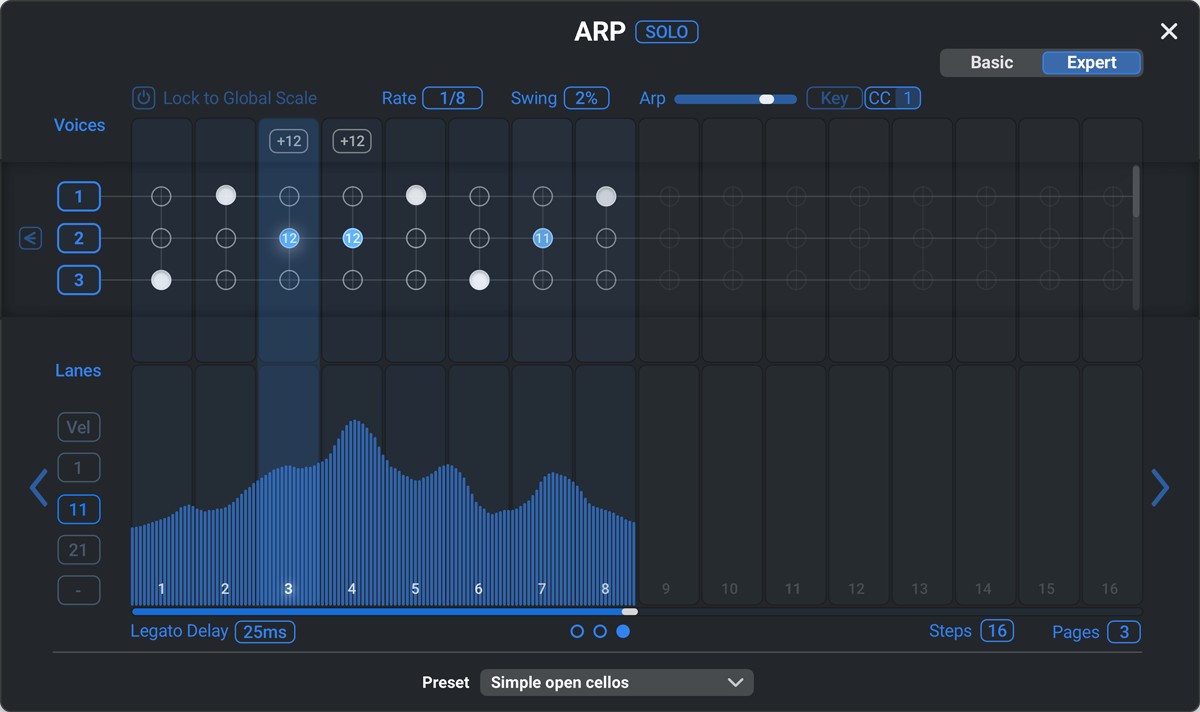
Arpeggiator – Create patterns, textures and custom melodies.
-
Trigger – Send notes and controllers to switch articulations on preset load.
-
Transformer – Limit dynamics, map notes or adjust keyswitches. Sequential processing allows transformations to be chained, with options to reverse values and reorder rows by drag and drop.
-
Repeater – Add rhythm to long notes with customizable repetition patterns
More Features:
-
Transposer Scale Lock – Keep transposed instruments within the selected scale while creating complete ensemble voicings.
-
Multiple Perform Page Layouts – Save different Perform Page layouts with individual humanization, preset transition and default preset settings.
-
Keyswitch Range – Define a range that is always passed through to routed instruments for immediate access to articulations.
-
Key Split – Play two or three independent orchestrations side by side within a Multipad.
-
Multipad Editor – Automate orchestration changes using transitions and conditions.
-
Transition Modes – Choose from three modes for seamless transitions and simultaneous orchestrations.
-
Performance and Preset Export / Import – Share presets, import orchestrations and layouts, and batch-import larger collections.
-
MPE Input Support – Use MPE controllers with per-note CC, Aftertouch and Pitch Bend data.
The Universal Orchestral Template works with any set of orchestral instruments and includes 200 curated orchestrations. Additional templates are available for SWAM instruments by Audio Modeling and the VSL Synchron Prime Edition.
Divisimate 2 works with most major DAWs, including Cubase, Studio One, Pro Tools, Reaper, Ableton Live, Digital Performer and Logic Pro X, and supports virtually any type of virtual instrument.

 Sound On Sound Review 08/2020
„Having recently used Divisimate in an orchestrally heavy project, it saved an enormous amount of time that would have been spent splitting parts manually.” Nick Magnus on Divisimate Version 1.1.
Mac:
- macOS 10.11 or higher
- 64 bit
Windows:
- Windows 10 or higher
- 64 bit
Required Registration:
Nextmidi products require you to register with the manufacturer at www.nextmidi.com to activate your license.
This product requires an activation!
An internet connection is required to authorize / activate the product.