

True Analog Tube Saturation, Fully In-The-Box
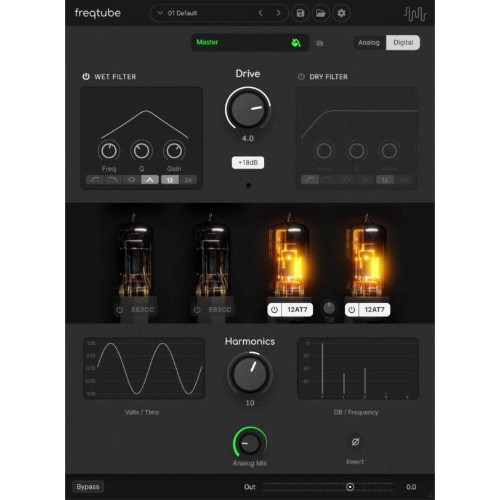
FreqTube FT1-EMU brings genuine analog tube behavior straight into your DAW. Built with component-level SPICE modeling, it recreates the warmth, rich harmonics, and natural dynamics of classic tube circuits without needing hardware. Enjoy pure analog tone with full digital convenience.
This plugin lets you automate every parameter, run multiple instances across tracks, and recall settings instantly, combining modern workflow speed with authentic tube character. When you’re ready, connect the optional FreqTube FT1 hardware with a single click to switch from software emulation to real analog processing. FT1-EMU is a hybrid platform for producers, engineers, and sound designers seeking true analog tone today and a seamless path to real hardware tomorrow.
Features
-
Component-Level Modeling: Component-level modeling based on a SPICE reference model delivers authentic tube saturation and natural dynamic behavior.
-
Real Hardware Integration: Optional one-click switching between software emulation and real FreqTube FT1 hardware.
-
Quad Tube Engine: Multi-stage tube architecture with 2× E83CC (bold saturation) and 2× 12AT7 (smooth harmonic warmth)
-
Analog-Style Filters: Primary and parallel multi-mode filters inspired by real analog hardware topology.
-
Deep Tone Control: Precise control over drive, harmonics, filtering, and signal flow for detailed tone shaping.
Mac:
- Mojave 10.14 or higher
- Apple Silicon or Intel CPU
- Core Audio based audio interface (Internal or External) for Digital Audio Workstation (DAW) main audio output*
- 2GB RAM
- 200MB Disk space
Windows:
- Windows 10 (Build 1909 and later) and Windows 11
- 64-bit
- CPU Intel® Core™ i5 (or higher) processor or an AMD Ryzen 5 (or higher) multi-core processor with minimum 4-cores and minimum 2Ghz processor speed.
- ASIO based audio interface for DAW main audio output*
- 2GB RAM
- 200MB Disk space
*Freqport plugins are real-time hardware based plugins and as such off-line rendering cannot be used in your DAW project. This may be different from your usual workflow.
Before using any real-time plugin, and before using Freqport software, its important that your system can playback your DAW projects in real-time without any dropouts.
Freqport system runs separately to the main audio I/O used in the DAW. Use a Core Audio or ASIO audio interface as you DAW main interface and run your DAW without audio dropouts before using Freqport products.
Digital Audio Workstations:
- All major DAWs that support VST3, AU, AAX (64bit plugins)
- Not fully supported: Wavelab
Required Registration:
FreqPort products require you to register with the manufacturer at www.freqport.com and with www.ilok.com to activate your license.
This product requires an activation!
You can either "soft" activate on your computer without addditional hardware or transfer the license to an iLok USB dongle which has to be purchased separately. The iLok dongle can be used to run the protected software on different computers. Your licenses can be easily manged using the iLok Licence Manager. To protect your investment against theft or loss we recommend the iLok Zero Downtime protection with TLC.
An internet connection on any computer and a free user-accout at www.ilok.com is required to authorize the product.
Please check with the software manufacturer which iLok version is required at least if you want to use a hardware iLok!
