


Must-have tool for content creators and live sound engineers
As a podcaster, live streamer, video creator or live sound engineer, you often feature multiple audio sources in your content. Oftentimes, you can’t predict the levels of these sources, so you either need to ride the channel faders manually, or write tedious volume automation slopes in post-production to ensure levels stay consistent throughout.
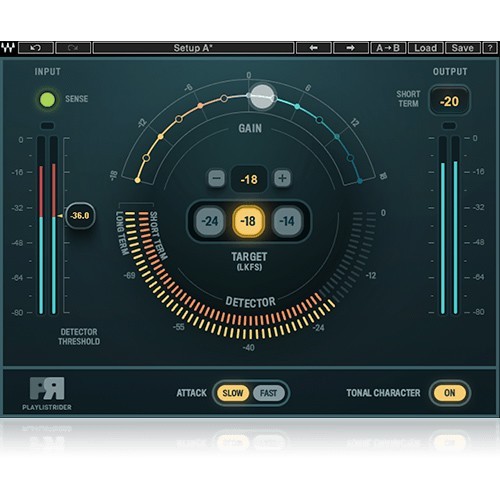
Playlist Rider does all this work for you. The plugin automatically adjusts the volume of multiple sources to a selected volume target – as if a mixing engineer was riding the faders for you. Unlike limiters which crush your audio’s dynamic range, Playlist Rider preserves the natural dynamics of your sources by simply adjusting their volume in real time.
Features:
-
Must-have tool for content creators and live sound engineers
-
Smooths out the volume levels of multiple audio sources
-
Sets volume to meet the selected target, automatically and in real time
-
Nondestructive adjustment that preserves the source’s dynamic range
-
As easy as set-and-forget
-
Fast or slow attack times
-
Tonal character shaper for smoothing out tonal differences
-
Input detector threshold for low-volume part exclusion
-
Runs in major audio and video editing software
-
Compatible with Waves’ eMotion LV1 mixer and SuperRack plugin host
Mac:
- macOS Ventura 13, Sonoma 14, Sequoia 15, Tahoe 26
- Intel or Silicon Architecture
- RAM: 8GB (16GB recommended)
- 1024x768 or higher display resolution
Windows:
- Windows 10 / 11
- 64 bit
- X64 compatible Intel or AMD CPU
- RAM: 8GB (16GB recommended)
- 1024x768 or higher display resolution
Please check for details and latest information HERE!
Bundle- / Product-Content
All Plug-Ins, Collections and Bundles include the identical content/version as described on www.waves.com. As the content/version might be extended by the supplier from time to time, our descriptions might not be up to date in rare cases.
To always get the latest WAVES version, you need a valid WavesUpdatePlan "WUP". With a new purchase of PlugIns and Bundles 12 month of Free Update Plan are included!
Required Registration:
Waves products require you to register with the manufacturer at www.waves.com to activate your license.
This product requires an activation!
An internet connection is required to authorize / activate the product.