

Just as a painter needs a clean canvas to begin painting, mixers need a well-balanced sound system for mixing. Since every sound system is different and behaves differently in each environment, we need to calibrate the system to smooth out its performance; in a live setting, this is known as tuning the PA.
If not tuned, the system’s frequency response will behave erratically: music may sound different than we’re used to, and our mixing adjustments will not respond as we expect. Worse, if a system is not time-aligned, there may be phase cancellation affecting valuable low-frequency impact. In many cases, access to the system processors is limited and there’s limited time before sound check. At these times especially, TRACT will save the day.
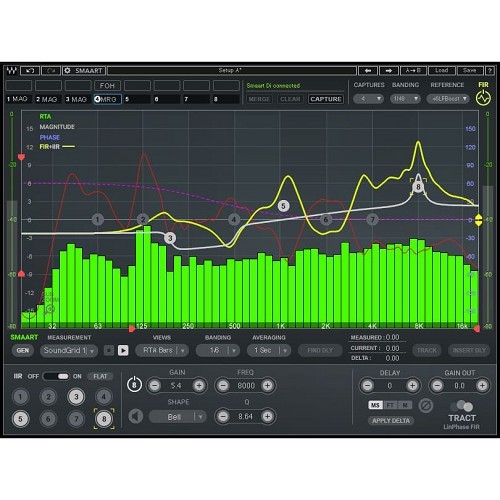
TRACT calculates a corrective FIR EQ curve and time alignment corrections using data from Smaart v8 or Di v2. Quickly take and merge up to 8 measurement snapshots of your system, and select a reference as the basis for your EQ corrections. Four common reference curves are included, or create and save your own reference presets.
Once the FIR EQ is calculated, you can manipulate it by changing the reference curve, limiting its frequency and amplitude ranges, or by supplementing it with up to 8 bands of IIR EQ filters. IIR filter shapes include: Bell, Low/High Shelves, Flat-Tops, Butterworth and Linkwitz-Riley curves, a Tilt EQ with a variable frequency pivot point, and an All-Pass filter.
The plugin includes a minimal-phase FIR component, which works at very low latency and with low phase distortion, as well as a linear-phase FIR component. You can use it in a live setting with any mixing console (via Waves MultiRack), with the eMotion LV1 mixer, or you can use it within any major DAW.
With TRACT and Smaart, you can quickly and easily get any sound system to perform its very best, providing a well-balanced foundation – a clean canvas – for happy, accurate mixing.
Overview
-
Auto-correction EQ and time alignment for quickly tuning any sound system
-
Integrates with Smaart v8 and Smaart Di v2 for accurate measurement analysis
-
Can be used live or in the studio
-
Runs within MultiRack, eMotion LV1, or any major DAW
-
Includes minimal-phase FIR and linear-phase FIR components
-
Create a corrective FIR EQ curve to balance your system’s EQ
-
Capture and merge up to 8 snapshots of measured response signals
-
8 bands of industry-standard IIR filters
-
Create custom reference curves
-
Calculate and add delay to time-align a sound system
-
Sub zoom allows a closer look at the low frequencies while phase-aligning subs
-
Can be used without Smaart as a high-quality 8-band equalizer
Mac:
- macOS Ventura 13, Sonoma 14, Sequoia 15, Tahoe 26
- Intel or Silicon Architecture
- RAM: 8GB (16GB recommended)
- 1024x768 or higher display resolution
Windows:
- Windows 10 / 11
- 64 bit
- X64 compatible Intel or AMD CPU
- RAM: 8GB (16GB recommended)
- 1024x768 or higher display resolution
Please check for details and latest information HERE!
Bundle- / Product-Content
All Plug-Ins, Collections and Bundles include the identical content/version as described on www.waves.com. As the content/version might be extended by the supplier from time to time, our descriptions might not be up to date in rare cases.
To always get the latest WAVES version, you need a valid WavesUpdatePlan "WUP". With a new purchase of PlugIns and Bundles 12 month of Free Update Plan are included!
Required Registration:
Waves products require you to register with the manufacturer at www.waves.com to activate your license.
This product requires an activation!
An internet connection is required to authorize / activate the product.
