


One Hub for Music and Picture
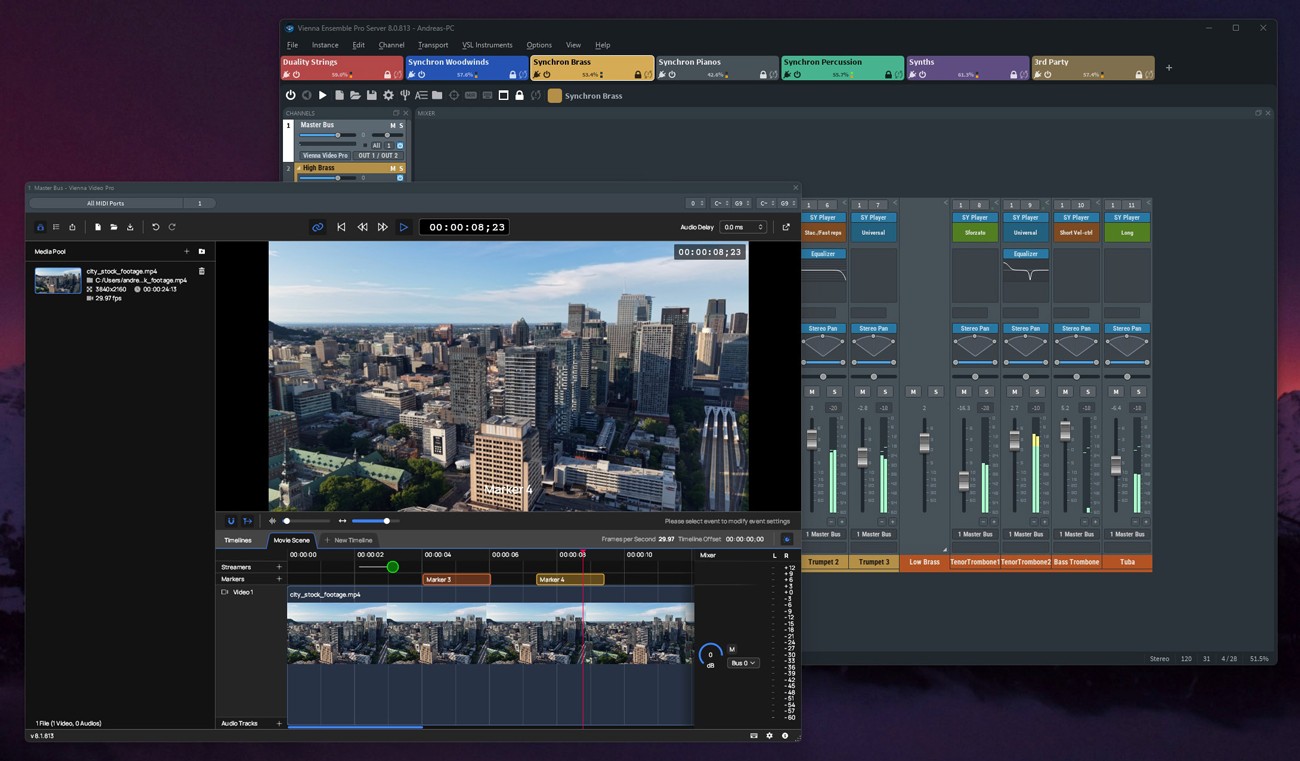
Designed as the central hub of modern music production, Vienna Ensemble Pro 8V brings instruments, effects, computers, and now even video playback together in one intelligent environment. With faster loading times, smarter server networking, advanced performance monitoring, crash protection, and a host of FX plug-ins, even the largest templates remain responsive and reliable. Integrated Vienna Video Pro extends your setup with smooth, GPU-accelerated video streaming on remote machines, complete with timelines, markers, and flexible sync options. Whether you’re working on a single system or across complex multi-computer studios, Vienna Ensemble Pro 8V keeps your entire creative workflow perfectly in sync.
Includes all features of Vienna Ensemble Pro 8 plus:
Vienna Video Pro
-
Stream video and audio playback directly through Vienna Ensemble Pro 8V (also from remote machines) to free up your DAW machine’s CPU
-
Fluid, GPU-accelerated performance with thumbnails and audio waveforms generated in real time.
-
Support for multiple timelines, each with its own frame rate.
-
Add streamers and markers directly within the timeline for precise scoring cues.
-
Sync to host application or play independently in free render.
-
Convenient video export option – multiple resolutions and bitrates, H264 container, mp4. Keep working during export.
-
Load/save complete video projects within Video Pro.
-
Extremely low CPU impact – heavy processing is done on the GPU.
-
Option to delay video audio playback for perfect sync with picture.
-
Timeline timecode offset support, including negative values for full compatibility with Cubase and other DAWs.
-
Blackmagic Design support.
-
MMC/MTC support.
-
Supports virtually all common video formats.
Vienna Ensemble Pro 8
-
Cross-platform MIDI and audio LAN mixing host
-
Networked hosting of VST/AU plug-ins across Macs and PCs
-
Group Edit to sync settings of all Synchron Player instances
-
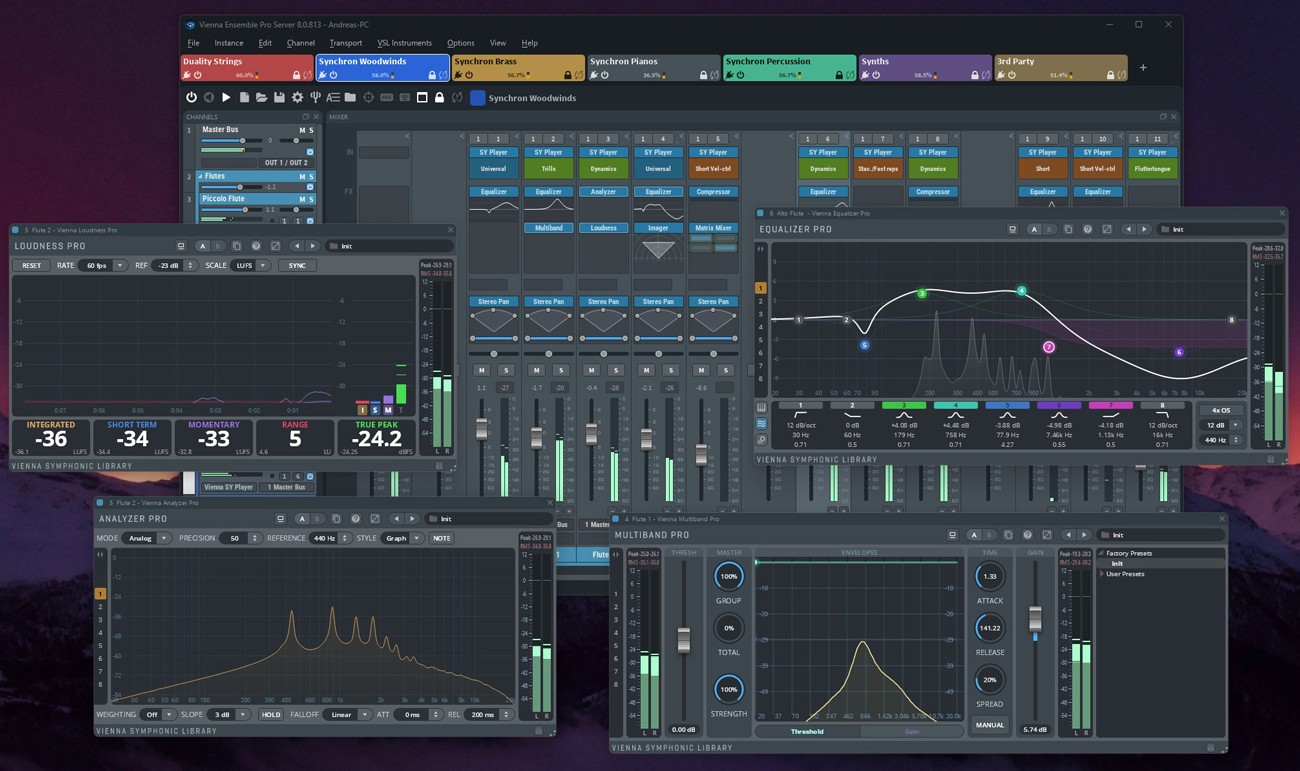
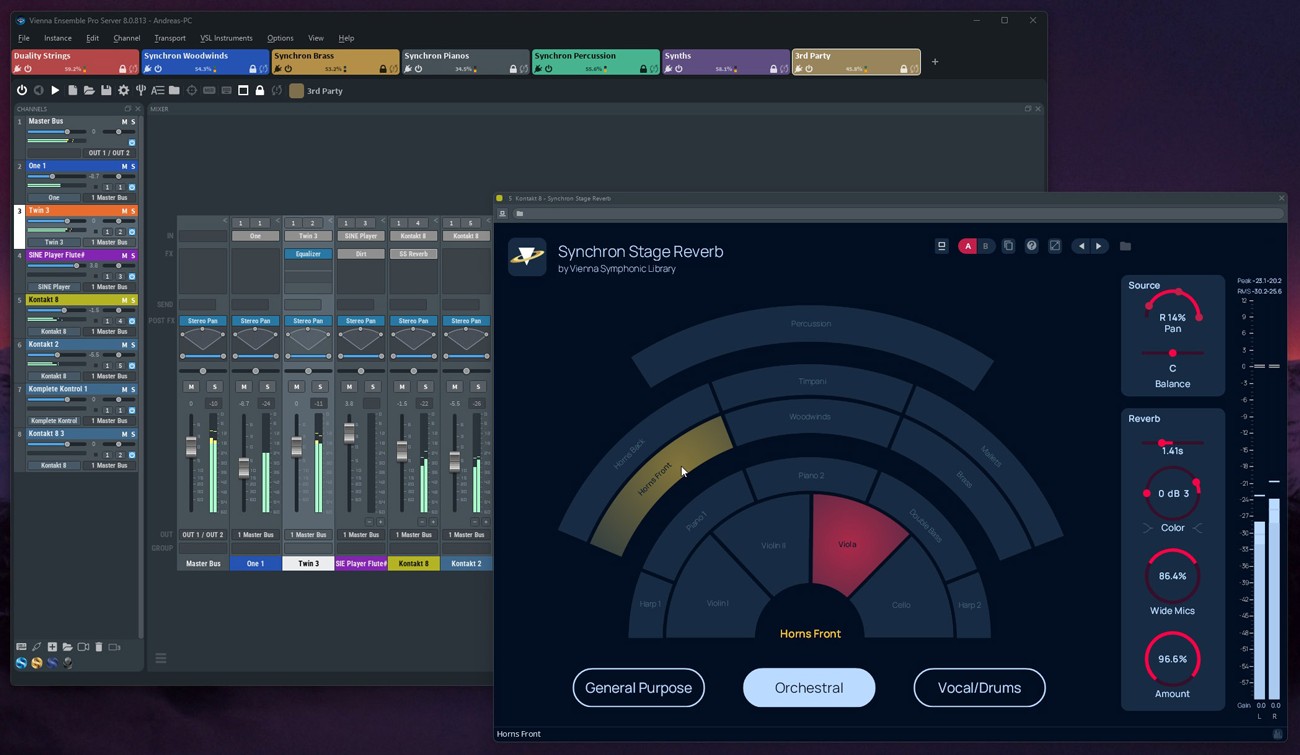
Integrated Synchron Stage Reverb and Vienna Suite Pro plug-ins
-
Create large templates quickly using Channel Sets library
-
Numerous studio life savers such as crash protection, preserve instances, automation mapping, activity monitor, and many more.
New Version 8.1 Features
- Completely redesigned Vienna Video Pro interface
- New MCP server (Public Beta) – control Vienna Ensemble Pro with your AI assistant by Anthropic (Claude), Google (Antigravity), or OpenAI (Codex). Requires your own AI subscription.
- Rock-solid Audio Input, now handles mono, stereo, surround and immersive inputs
- Immersive & 3D support up to 22.2, Dolby Atmos and Auro-3D, incl. all Vienna Suite Pro plug-ins
- Redesigned Automation browser with convenient search and full undo
- Reworked auto-backup keeps your projects safe
- Automatic VST2-to-VST3 migration of hosted plug-ins with saved states preserved
- Smarter folder and channel enable/disable plus a new Force Enable command
- MIDI-aware channels – auto-enable on incoming MIDI, with smarter instance focus
- Countless performance, stability and interface refinements
Smart Connectivity. Central Control.
Vienna Ensemble Pro has long been the backbone of professional studios worldwide, connecting virtual instruments, effects, and computers into one powerful network across Macs and PCs. With Vienna Ensemble Pro 8, this concept reaches a new level of intelligence and reliability, offering smarter server networking, faster loading times, advanced performance monitoring, crash protection, a modernized interface, new included FX plug-ins and so much more. Whether on a single machine or across complex multi-computer setups, Vienna Ensemble Pro 8 excels as the creative hub at the heart of your studio.
New Features
Channels & Presets
-
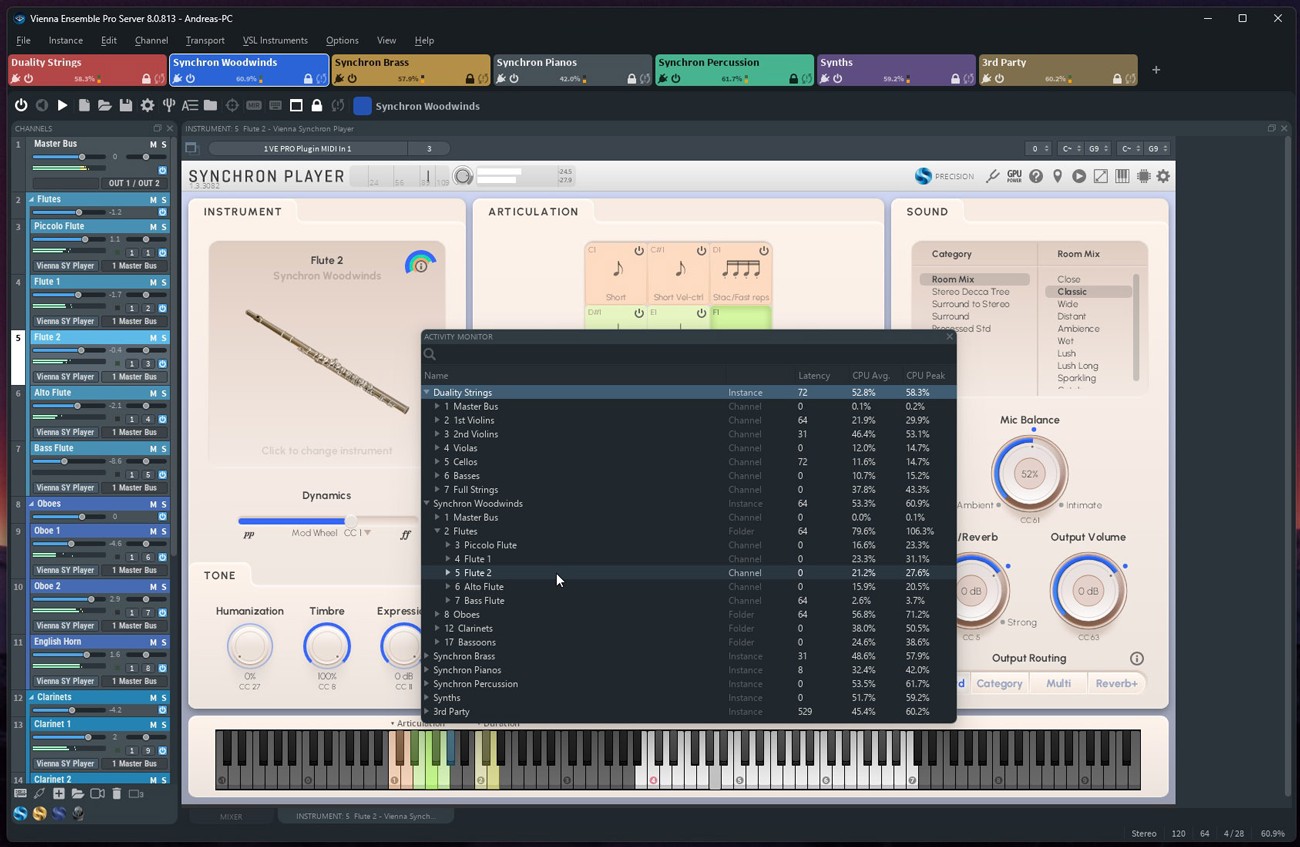
Group Edit for all Synchron Player instances – Copy-Paste settings between Synchron Player instances, including Mixer Presets, Tuning Tables, Controller Settings.
-
Integrated Synchron Stage Reverb SO – convolution reverb recreating the ambience of Stage A of Vienna Synchron Stage with pre-defined positions (stereo orchestra)
-
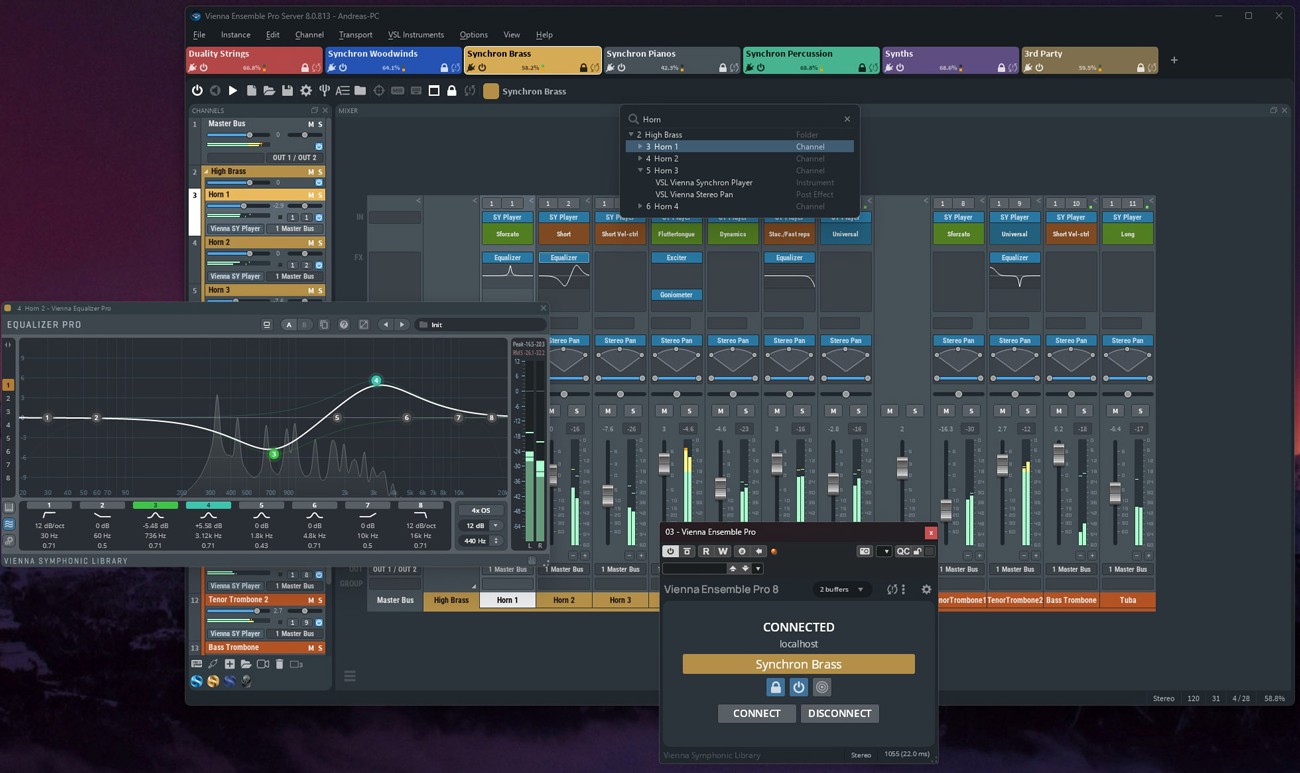
Now includes all plug-ins from Vienna Suite Pro directly integrated in FX inserts
-
New Channel Sets Library – manage and insert factory or user-defined channel setups instantly.
-
Enhanced plug-in preset browser – lists all presets of each available plug-in.
-
Redesigned preset control bar – improved usability and preset management similar to Vienna Suite Pro.
Performance & Workflow
-
Faster project loading – When loading project data into an instance that already contains similar plug-in configurations, Vienna Ensemble Pro 8 intelligently reuses existing plug-ins instead of recreating or reloading them, greatly improving load times and often reducing the need for the “Decouple” feature.
-
Crash Protection – If a project file (.vep or .vesp) crashes during loading, you can selectively disable the element that caused the crash on the next load attempt, with the option to disable other elements as well (for example, all plug-ins of the same type). Large templates remain accessible and editable, preventing a single faulty plug-in from rendering an entire project unusable.
-
Activity Monitor – Displays a detailed, sortable overview of CPU and performance usage for each instance, channel, and plug-in, allowing you to quickly locate heavy performance hitters or plug-ins that have hung during processing.
-
Search function – Use Ctrl/Cmd+F to quickly find plug-ins, channels, or parameters within an instance and Ctrl/Cmd+Shift+F across the entire server.
-
Undo/Redo History – track and revert changes directly from the Edit menu.
Networking & Connectivity
-
Servers are now identified by name instead of IP address – no need for static IPs.
-
Automatic connection by Server Name for seamless template switching between machines.
-
New “Accept new connections” option in Server Preferences for better control while switching host projects.
-
Improved reliability of server discovery (no longer dependent on Bonjour).
Other Improvements
-
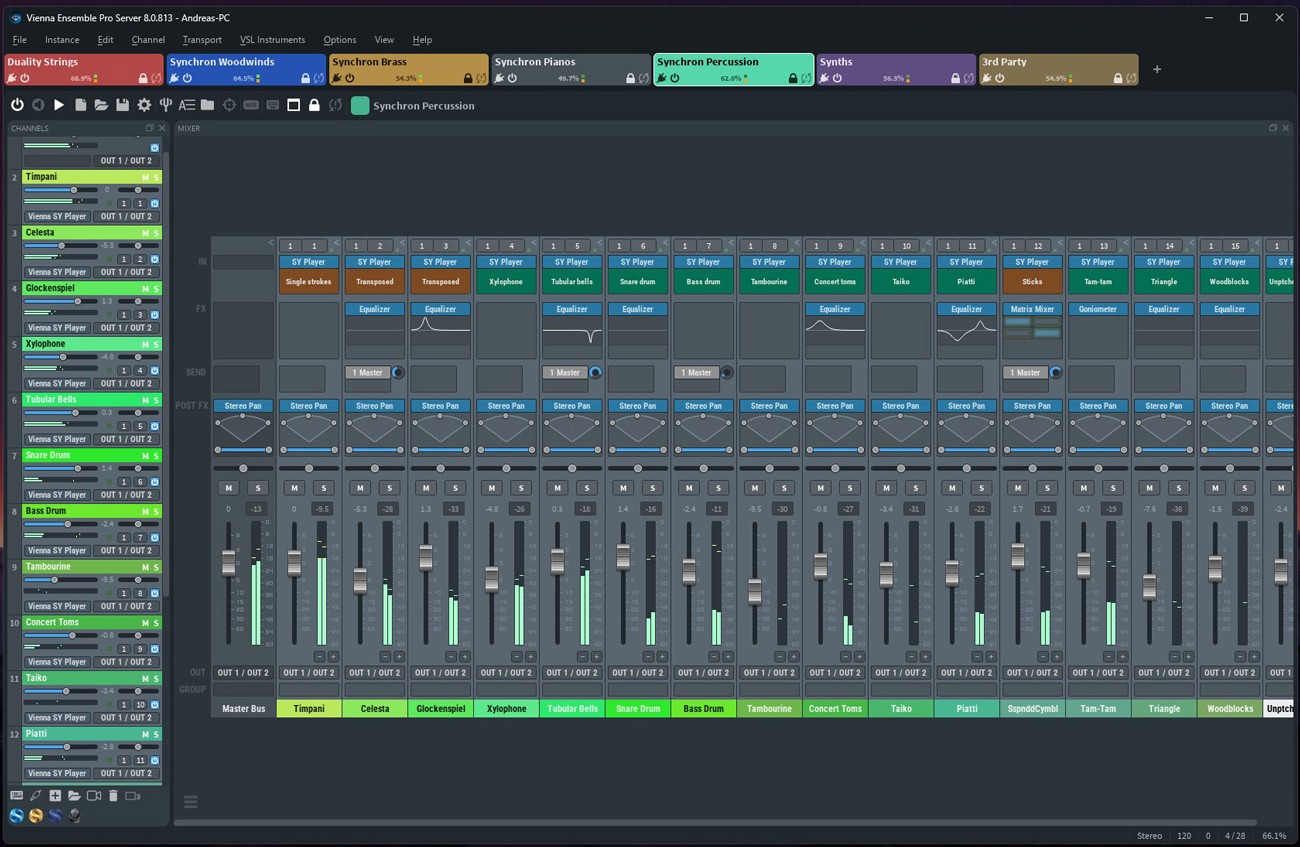
Major GUI refresh – modernized, more responsive, and easier to navigate.
-
OSC interface fully documented
Existing Features
Connectivity
-
Cross-platform MIDI and audio LAN solution for Macs and PCs.
-
No audio interfaces, no MIDI interfaces on your additional networked computers – All you need is Ethernet with a Gigabit connection.
-
AU/VST/VST3 (Mac) and VST/VST3 (PC) hosting – Instantiate any VSL and 3rd party VST and AU plug-ins (works with nearly all available VST/AU plug-ins and supports multiple outputs).
-
VST3/AAX Native/MAS connector plug-ins – Supports up to 48 MIDI ports and 768 audio ports per instance.
-
VST hosting on the Mac, allowing for full compatibility with Windows
-
Audio input plug-in – Route audio signals from your DAW into Vienna Ensemble Pro, e.g., to turn it into a virtual FX rack on your networked computer.
-
AU/AU3/VST/VST3/AAX Native/MAS plug-in or stand-alone.
Core Features
-
Preserve Instance – Disconnect Vienna Ensemble Pro from your sequencer while keeping all of your instruments and samples loaded, and re-connect to a new cue or project without loading again.
-
Full surround support up to 7.1 with integrated plug-ins for surround-to-surround balancing and mono/stereo-to-surround.
-
UPDATE: FX Plug-ins – All Vienna Suite Pro plug-ins, with convenient GUI displays embedded in the mixer channel view: Compressor Pro, Equalizer Pro, Exciter Pro, Limiter Pro, Analyzer Pro, Hybrid Reverb Pro
-
Also included: Pro versions of our surround-specific Vienna Suite plug-ins: Matrix Mixer Pro, Surround Balance Pro, Surround Pan Pro.
-
Frozen/Disabled channels allow unloading all plug-ins (including their allocated memory) from a selected channel, while keeping data intact
-
Faster saving times – Instance data is compressed/decompressed to increase saving speed with demanding plug-ins like NI Kontakt.
-
Plug-in latency compensation ensures full sync of all plug-ins inside each Vienna Ensemble Pro instance.
Usability Features
-
Simplified Automation – Detailed clear names of all automatable parameters available in Vienna Ensemble Pro and all inserted plug-ins.
-
Extended with Channel Sets in Vienna Ensemble Pro 8: Channel grouping allows assigning channels to a group, with option to link selected parameters to the entire group
-
Favorites Manager – Create a list of your go-to plug-ins (FX/instruments)
-
Favorites (auto-populated) – Always see your recently most used plug-ins on top of your plug-in list
-
Customize plug-in use in the Vienna Ensemble Pro Preferences
-
Improved plug-in scanning for a smoother experience with troublesome or incompatible plug-ins
-
Combined now: Instance & Folder disabling (automatable)
-
Copy/paste channels – For flexible template adaptations (Comm. C/V, Ctrl C/V)
GUI Features
-
Extended with new Activity Monitor in Vienna Ensemble Pro 8: Instance CPU Usage – Realtime read-out of the specific CPU load
-
Instance MIDI/Audio activity – Better overview, easy to observe and to control MIDI and audio activity
-
Vertical Instance List – For a quicker overview of all available instances (in addition to the tabbed view)
-
Articulation Display – The currently playing articulation is displayed directly in the channel (works for Vienna Synchron Player, Vienna Instruments Pro Player).
-
Missing Patches are indicated by a red frame (works for Vienna Synchron Player, Vienna Instruments Pro Player).
-
FX Mini GUI Displays – Watch some of your integrated FX plug-ins right in the channel view.
Licensing for Multiple Computers
You need one Vienna Ensemble Pro 8 license per computer. For example, if you have two computers, one main and one secondary machine, you need just one license if you’re running one or more instances of Vienna Ensemble Pro 8 on your secondary computer only. If you’re running one or more instances of Vienna Ensemble Pro on both your main and secondary machines, you need two licenses.
*Upgrades and User Discounts: You already own VSL Products?
After the login you can check in the shopping cart if you are entitled for a VSL User-Discount and apply it. This works for Upgrades, Crossgrades, EDU products and also when you complete Bundles. Simply add the desired products to your shopping cart and then check for the VSL User-Discount.
Please note that all discounted user-specific orders must be processed manually by our sales team and therefore may take up to one business day to be completed.
Mac:
- macOS 12 or higher, 64 bit
- Minimum: Intel Core i3 (Intel Core i5/i7/Xeon/M1/M2 recommended)
- RAM: 8GB (16GB recommended)
- SSD hard drive recommended
- Working Gigabit connection between master and networked computer(s). Also works on a one-computer setup.
Windows:
- Windows 10/11, 64 bit
- Intel Core i3 or AMD Athlon 64 X2 (Intel Core i5/i7/Xeon recommended)
- RAM: 8GB (16GB recommended)
- SSD hard drive recommended
- Working Gigabit connection between master and networked computer(s). Also works on a one-computer setup.
Required Registration:
Vienna Symphonic Library products require you to register with the manufacturer at www.vsl.co.at and with www.ilok.com to activate your license.
This product requires an activation!

You can either "soft" activate the software on your computer without addditional hardware or transfer the license to an iLok USB dongle which has to be purchased separately. The iLok dongle can be used to run the protected software on different computers. Your licenses can be easily manged using the iLok Licence Manager. To protect your investment against theft or loss we recommend the iLok Zero Downtime protection with TLC.
An internet connection on any computer and a free user-accout at www.ilok.com is required to authorize the product. In order to download and install your software products and sample libraries authorized via iLok, please use the Vienna Assistant.
Please check with the software manufacturer which iLok version is required at least if you want to use a hardware iLok!