


Upgrade from Vienna Ensemble Pro 8 to 8V
With this upgrade, you get Vienna Ensemble Pro 8V and expand your existing VEP 8 setup with full video integration. You can bring video directly into your projects, including timelines, markers, and GPU-accelerated streaming on remote machines. Even large templates remain responsive, and your workflow stays perfectly in sync, whether you’re working on a single computer or a multi-computer studio.
Vienna Ensemble Pro 8V – One Hub for Music and Picture
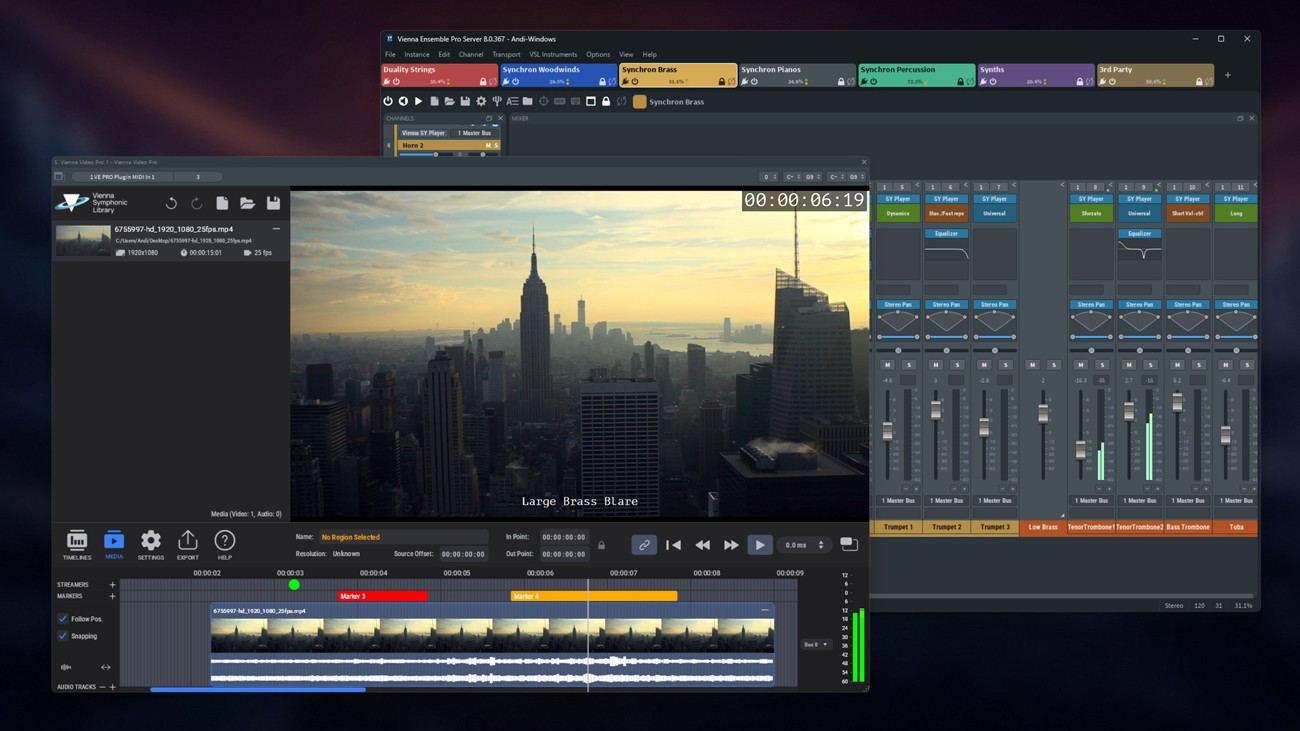
Designed as the central hub of modern music production, Vienna Ensemble Pro 8V brings instruments, effects, computers, and now video playback together in one intelligent environment. With faster loading times, smarter server networking, advanced performance monitoring, crash protection, and a host of FX plug-ins, even the largest templates remain responsive and reliable. The integrated Vienna Video Pro extends your setup with smooth, GPU-accelerated video streaming on remote machines – including timelines, markers, and flexible sync options. Whether you’re working on a single system or across complex multi-computer studios, Vienna Ensemble Pro 8V keeps your entire creative workflow perfectly in sync.
Includes all features of Vienna Ensemble Pro 8 plus:
Vienna Video Pro
- Stream video and audio playback directly through Vienna Ensemble Pro 8V (including from remote machines) to free up your DAW’s CPU
- Fluid, GPU-accelerated performance with real-time thumbnails and audio waveforms
- Support for multiple timelines, each with its own frame rate
- Add streamlines and markers directly within the timeline for precise scoring cues
- Sync to your host application or play independently in free render mode
- Convenient video export – multiple resolutions and bitrates, H264 container, mp4, while continuing to work
- Load and save complete video projects within Video Pro
- Extremely low CPU load – heavy processing handled by the GPU
- Option to delay video audio playback for perfect sync with picture
- Timeline timecode offset support, including negative values, for full compatibility with Cubase and other DAWs
- Blackmagic Design support
- MMC/MTC support
- Compatible with virtually all common video formats
*Upgrades and User Discounts: You already own VSL Products?
After the login you can check in the shopping cart if you are entitled for a VSL User-Discount and apply it. This works for Upgrades, Crossgrades, EDU products and also when you complete Bundles. Simply add the desired products to your shopping cart and then check for the VSL User-Discount.
Please note that all discounted user-specific orders must be processed manually by our sales team and therefore may take up to one business day to be completed.
Mac:
- macOS 12 or higher, 64 bit
- Minimum: Intel Core i3 (Intel Core i5/i7/Xeon/M1/M2 recommended)
- RAM: 8GB (16GB recommended)
- SSD hard drive recommended
- Working Gigabit connection between master and networked computer(s). Also works on a one-computer setup.
Windows:
- Windows 10/11, 64 bit
- Intel Core i3 or AMD Athlon 64 X2 (Intel Core i5/i7/Xeon recommended)
- RAM: 8GB (16GB recommended)
- SSD hard drive recommended
- Working Gigabit connection between master and networked computer(s). Also works on a one-computer setup.
Required Registration:
Vienna Symphonic Library products require you to register with the manufacturer at www.vsl.co.at and with www.ilok.com to activate your license.
This product requires an activation!

You can either "soft" activate the software on your computer without addditional hardware or transfer the license to an iLok USB dongle which has to be purchased separately. The iLok dongle can be used to run the protected software on different computers. Your licenses can be easily manged using the iLok Licence Manager. To protect your investment against theft or loss we recommend the iLok Zero Downtime protection with TLC.
An internet connection on any computer and a free user-accout at www.ilok.com is required to authorize the product. In order to download and install your software products and sample libraries authorized via iLok, please use the Vienna Assistant.
Please check with the software manufacturer which iLok version is required at least if you want to use a hardware iLok!