

Deals
Exclusive Crossgrade Offer: Get Hollywood Scoring Tools for only $199.
Own Sonuscore The Score? For a limited time, you can add EastWest Hollywood Scoring Tools to your setup with an exclusive $199 crossgrade offer instead of $299.
Start with more than 300 professionally composed scores, instantly build complete arrangements, customize instruments, patterns, and dynamics, then export your ideas as MIDI for further editing in your DAW.

From Your First Chord to a Finished Cue
Hollywood Scoring Tools gets you from your first idea to a complete arrangement faster. Instead of starting with an empty project, individual patches, and time-consuming template building, you begin with a playable musical Score.
More than 320 composer-crafted Scores combine instruments, patterns, dynamics, mixing, and effects into instantly playable setups. Play a chord and the entire arrangement follows your harmony. Change chords, shape the intensity with the mod wheel, and switch between different song sections in real time.
With more than 1,300 arrangements and over 160 instruments from EastWest and Sonuscore, the sonic palette ranges from full orchestra and cinematic synths to band and world instruments, choirs, and percussion.
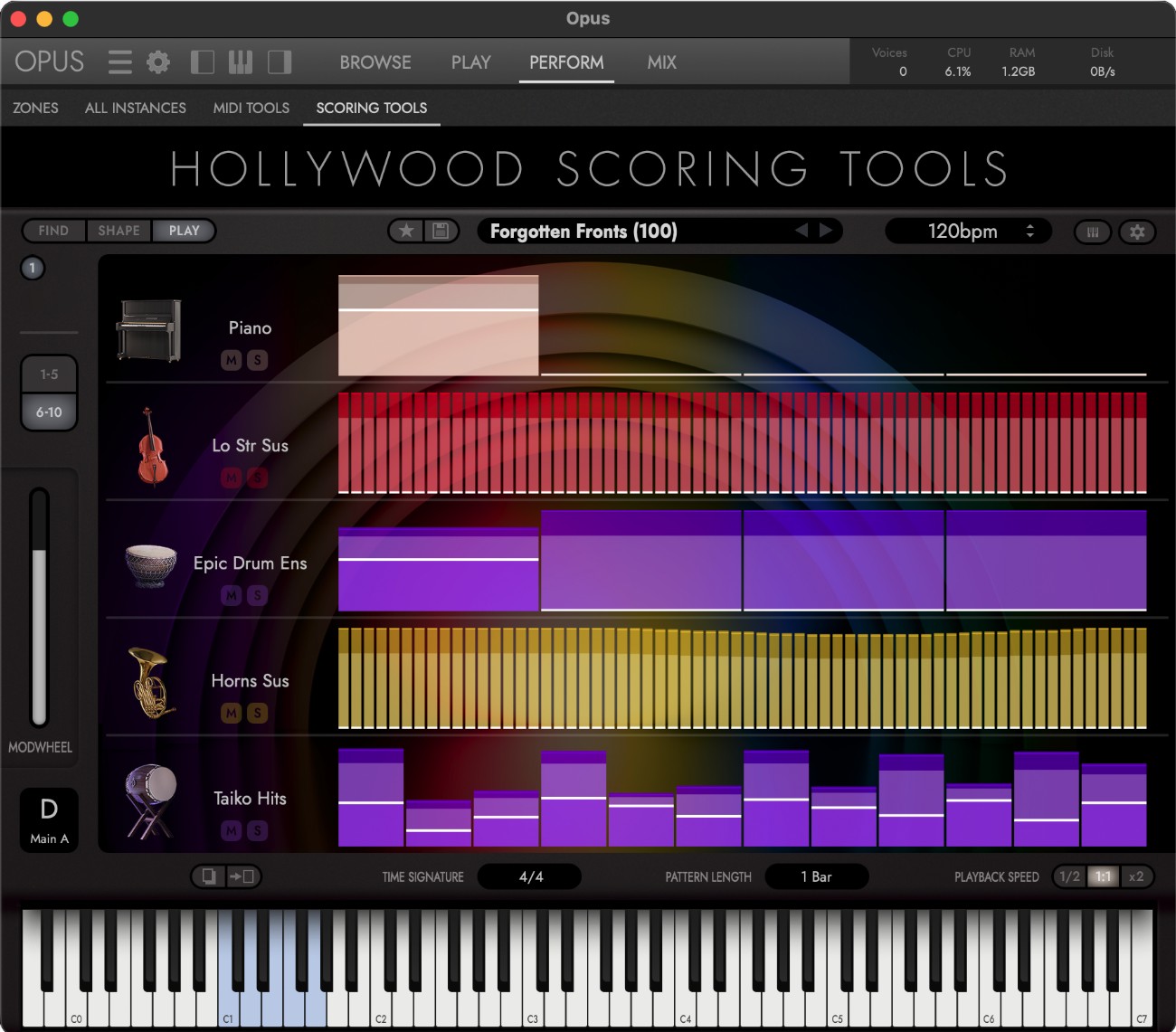
Start with a Score, Not an Empty Template
Each Score loads up to ten instruments including patterns, dynamics, and effects. The arrangements are already orchestrated and balanced, so you can start playing immediately, explore ideas, and develop them into your own cue.
Hollywood Scoring Tools does not compose for you. You control the chords, harmony, and musical direction. Every Score includes four arrangements - Intro, Main A, Main B, and Outro - that can be switched live via keyswitches. An additional Ending function brings the arrangement to a musical close.
Existing Scores can be extensively customized or used as a starting point for completely new setups. Instruments, patterns, dynamics, and effects can be adjusted and saved as your own User Scores.
Built by Composers - Not Algorithms
The Scores are not randomly generated combinations. More than 1,300 finished arrangements were created and fully orchestrated by professional composers. Instrumentation, patterns, dynamics, and effects were deliberately chosen to work musically.
The concept builds on the idea behind Sonuscore's The Score and combines it with EastWest instruments, the Opus engine, and expanded options for performance, mixing, and arrangement.
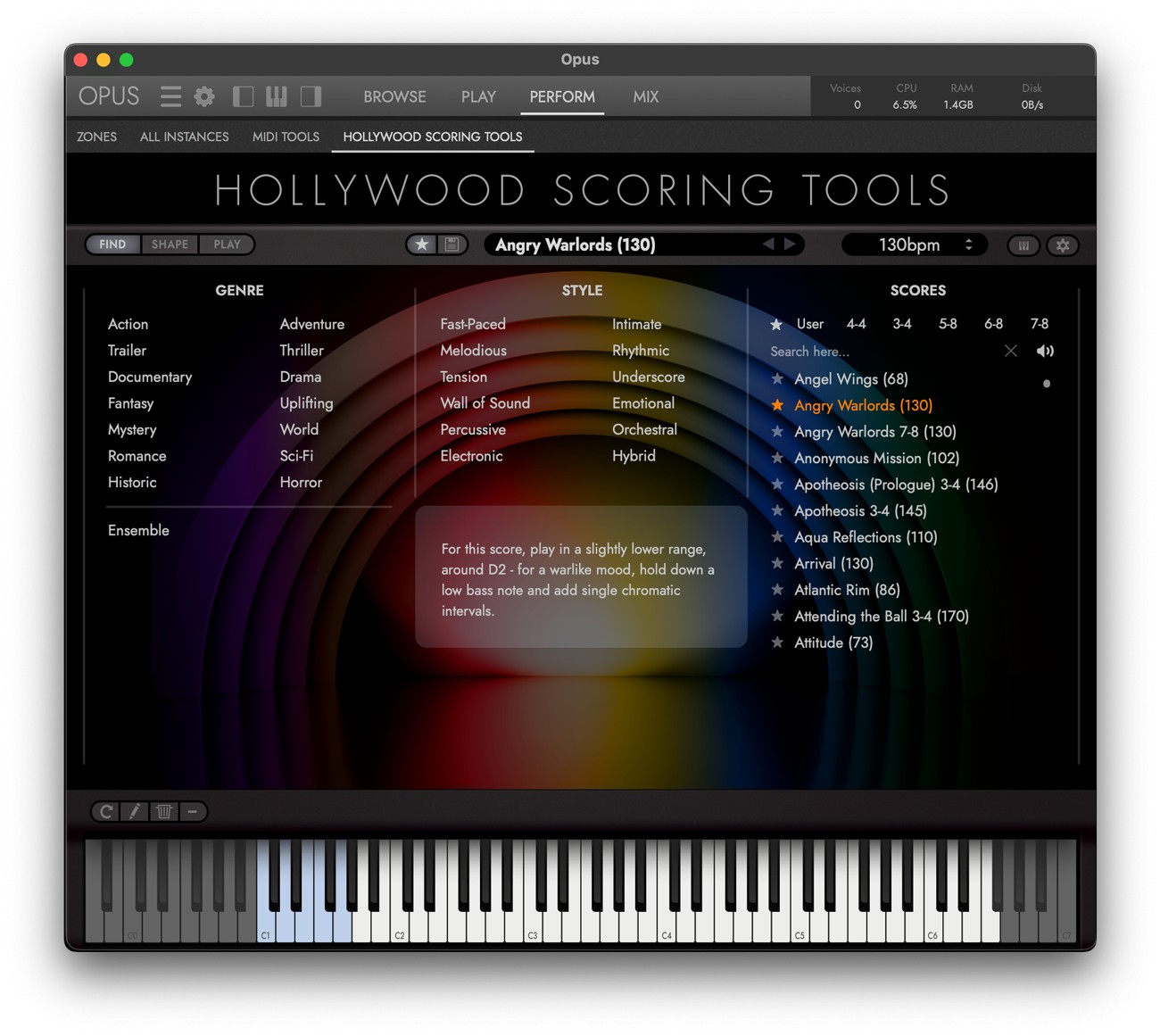
Find - Get to the Right Idea Fast
The Find section includes more than 320 Scores across 14 genres and 12 styles. Filters for genre, style, time signature, and name, along with favorites and performance notes, help you quickly find the right starting point for your cue.
An additional Ensemble category provides large multi-instrument setups such as Big Orchestra, Fantasy Orchestra, and various World Ensembles.
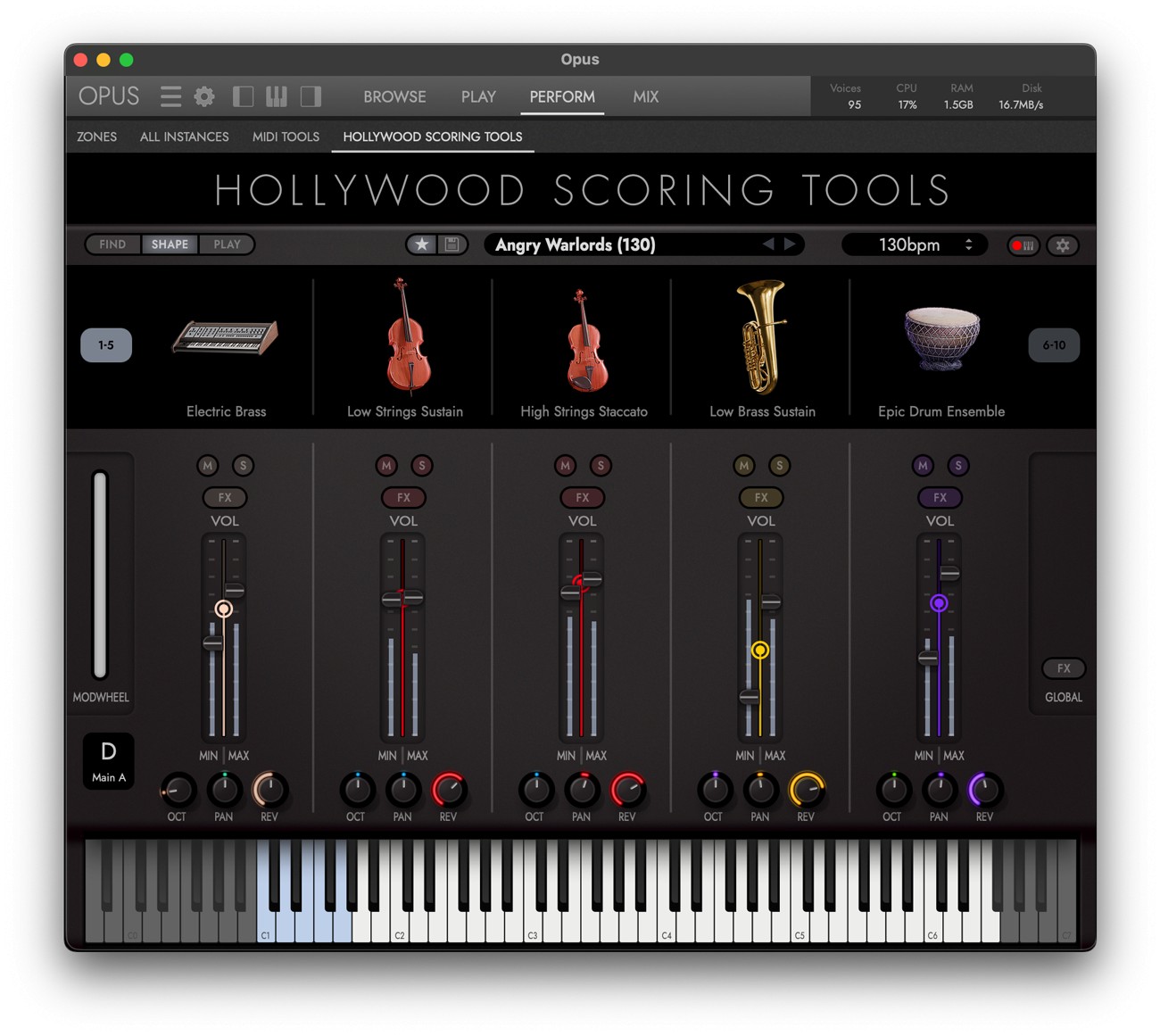
Shape - Make the Score Your Own
In Shape, you can customize the ten instrument slots individually. Swap instruments and articulations, and adjust volume, pan, octave, and reverb send for each layer separately.
Min and Max values determine how strongly each instrument responds to the mod wheel, allowing an entire arrangement to move from subtle and intimate to large and powerful with a single gesture. Each slot also provides Attack and Release, a 3-band EQ, and three Insert FX with a total of 21 effect types across six categories.
Play - Bring Your Arrangements to Life
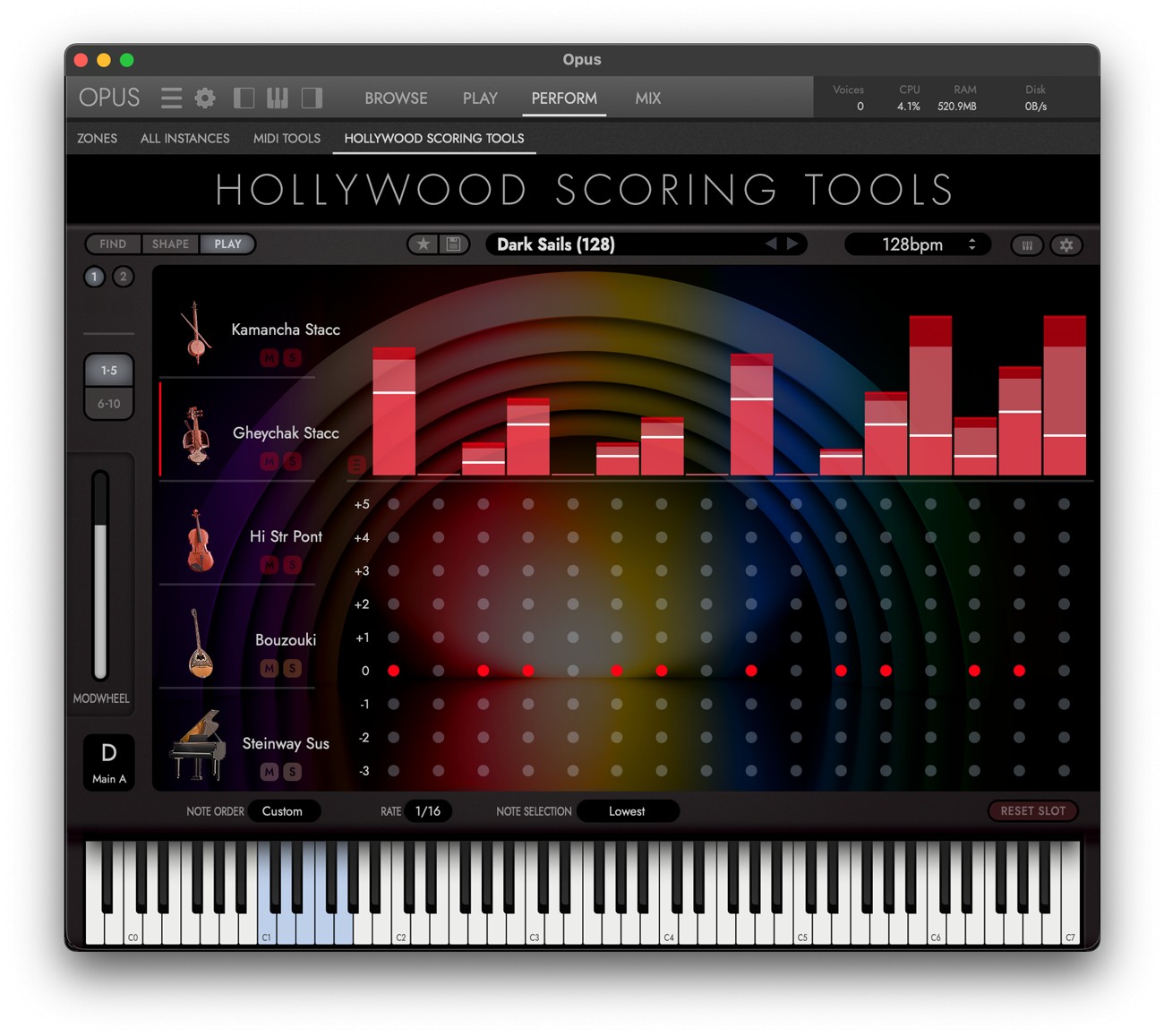
In the Play section, every instrument slot has its own arpeggiator. Note order, rate, velocity, and step sequences can be edited individually, making it easy to reshape existing patterns or create your own movement.
Patterns can be one, two, or four bars long and played back in Half-Time, Normal, or Double-Time. Multiple time signatures are supported, and the four arrangements of a Score can be switched directly from the keyboard or copied and used as the basis for your own variations.
Over 160 Instruments Across Five Sonic Worlds
-
Orchestra: Strings, Brass, Woodwinds, Mallets, Harp, Piano, and Celesta
-
Synths: Leads, Hits, Basses, Pads, and Ambience FX
-
World: Plucked, Bowed, Metallophones, Wind, and Percussion
-
Band: Bass, Guitar, Drumset, and Keys
-
Choirs & Percussion: Choir and Percussion
The included instruments draw from the extensive sonic worlds of EastWest and Sonuscore, covering traditional orchestral sections as well as modern synths, band sounds, and instruments from around the world.
Take It Straight into Your DAW
Once your arrangement is ready, you can drag the performance directly into your DAW as a multitrack MIDI file. Each instrument slot is placed on its own named MIDI track, allowing you to edit parts, rearrange them, or revoice them with other instruments and libraries from your existing setup.
The included instruments can also be loaded individually in Opus outside the Scoring Engine and played like traditional virtual instruments.
Features at a Glance
- More than 320 composer-crafted Scores
- More than 1,300 arrangements
- Four arrangements per Score plus Ending
- Over 160 instruments from EastWest and Sonuscore
- 14 genres, 12 styles, and an additional Ensemble category
- Up to ten instrument slots per Score
- Instruments and articulations can be freely swapped
- Individual mixer, dynamics, and effects settings per slot
- Dedicated arpeggiator for every instrument slot
- One-, two-, or four-bar patterns with Half-Time, Normal, and Double-Time playback
- 21 effect types across six categories
- Convolution and Algorithmic Reverb
- Create and save your own User Scores
- Multitrack MIDI export with a separate track for each instrument
- All instruments can also be played individually in Opus
- NKS ready
- Standalone, VST, VST3, AU, and AAX
- Runs in the free EastWest Opus Player
Less Programming. More Composing.
Hollywood Scoring Tools gets you from an idea to a finished cue faster. Instead of searching for instruments and building templates, you start with a playable arrangement, shape it into your own sound, and continue developing it freely in your DAW.
This library includes "Opus" as a Sample-Player.
Mac:
- macOS 10.15 or higher
- 64 bit
- Quad-Core CPU (Octa-Core recommended)
- 2,7 GHz or higher
- RAM: 16GB (32GB or more recommended)
- SSD hard drive (SATA or PCIe)
Windows:
- Windows 10 or higher
- 64 bit
- ASIO sound driver
- Quad-Core CPU (Octa-Core recommended)
- 2,7 GHz or higher
- RAM: 16GB (32GB or more recommended)
- SSD hard drive (SATA or PCIe)
Required Registration:
EastWest products require you to register with the manufacturer at www.soundsonline.com and with www.ilok.com to activate your license.
This product requires an activation!
You can either "soft" activate on your computer without addditional hardware or transfer the license to an iLok USB dongle which has to be purchased separately. The iLok dongle can be used to run the protected software on different computers. Your licenses can be easily manged using the iLok Licence Manager. To protect your investment against theft or loss we recommend the iLok Zero Downtime protection with TLC.
An internet connection on any computer and a free user-accout at www.ilok.com is required to authorize the product.
Please check with the software manufacturer which iLok version is required at least if you want to use a hardware iLok!

