
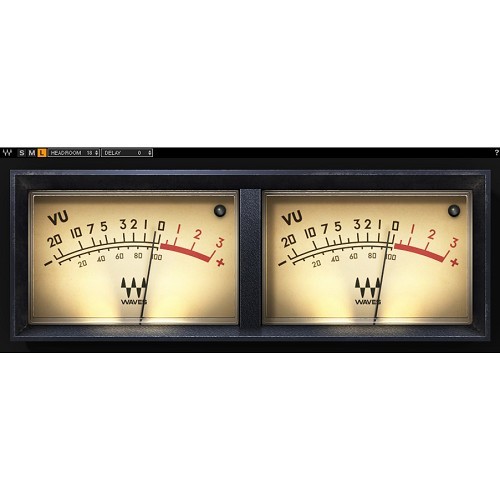



Are your mixes too often muddled and congested, even though you’re carefully watching peak levels in your DAW? If so, you are probably not using a VU meter. Whereas the peak meters in your DAW focus on the loudest moments in the audio, VU meters average out many of the shorter peaks, mimicking the way our ears react to sound and giving you a more realistic representation of the way audio level changes are actually perceived.
VU meters have been a proven industry standard for decades, across multiple musical genres and platforms, assisting engineers to set proper recording levels and mix with adequate headroom and a well-balanced gain structure.
With unparalleled smoothness and perfect ballistic response that equals the best hardware VU meters, the Waves VU Meter plugin will help you maintain proper gain staging for a clear and spacious mix.
Load the Waves VU Meter on any or all tracks while recording to make sure your recording levels are not too hot, or insert it on your master buss and pin it to your screen for a precise visual reference of your mix’s overall levels.
-
Meter average levels to achieve a well-balanced mix
-
Accurate ballistic response with smooth movement & fast refresh rate
-
Headroom calibration: 4 to 26 dB
-
Classic console VU meter design
Mac:
- macOS Ventura 13, Sonoma 14, Sequoia 15, Tahoe 26
- Intel or Silicon Architecture
- RAM: 8GB (16GB recommended)
- 1024x768 or higher display resolution
Windows:
- Windows 10 / 11
- 64 bit
- X64 compatible Intel or AMD CPU
- RAM: 8GB (16GB recommended)
- 1024x768 or higher display resolution
Please check for details and latest information HERE!
Bundle- / Product-Content
All Plug-Ins, Collections and Bundles include the identical content/version as described on www.waves.com. As the content/version might be extended by the supplier from time to time, our descriptions might not be up to date in rare cases.
To always get the latest WAVES version, you need a valid WavesUpdatePlan "WUP". With a new purchase of PlugIns and Bundles 12 month of Free Update Plan are included!
Required Registration:
Waves products require you to register with the manufacturer at www.waves.com to activate your license.
This product requires an activation!
An internet connection is required to authorize / activate the product.
